我们在上一章节springboot整合flowable的时候,通过springboot的自动装配ProcessEngineAutoConfiguration类,会自动装配SpringProcessEngineConfiguration,所以我们可以直接注入erProcessEngine,ProcessEngine负责与各个服务进行交互和管理流程的整个生期:
| 方法 | 说明 |
|---|---|
| startExecutors() | 启动所有流程引擎中的执行器。执行器用于处理流程实例的执行,在引擎启动时,执行器会自动运行并处理待办任务和定时任务 |
| getRepositoryService() | 获取流程仓库服务对象。用于管理流程定义的部署和查询 |
| getRuntimeService() | 获取运行时服务对象。用于操作流程的运行时数据,如启动流程实例、执行流程任务、查询流程实例状态等 |
| getFormService() | 获取表单服务对象。用于管理表单数据和处理与表单相关的操作,如获取表单内容、保存表单数据等 |
| getTaskService() | 获取任务服务对象。用于管理任务数据和处理与任务相关的操作,如创建任务、完成任务、查询任务列表等 |
| getHistoryService() | 获取历史数据服务对象。用于访问和查询流程的历史数据,如查询已完成的流程实例、查询历史任务等 |
| getIdentityService() | 获取身份验证和授权服务对象。用于管理用户、组、角色等身份信息,以及进行权限和身份验证的操作 |
| getManagementService() | 获取管理服务对象。用于进行底层的引擎管理和操作,如数据库管理、作业管理、引擎配置等 |
| getDynamicBpmnService() | 获取动态 BPMN 服务对象。用于动态修改流程定义的流程元素,如添加活动、删除活动、修改连线等 |
| getProcessMigrationService() | 获取流程迁移服务对象。用于支持流程定义的迁移操作,如迁移流程实例、修改流程定义版本等 |
| getProcessEngineConfiguration() | 获取流程引擎的配置对象。可以通过配置对象进行流程引擎的详细配置和定制,如数据库配置、作业调度配置、缓存配置等 |
一,部署流程
准备好流程图(xml文件,可参考文章最后资源中的xml),然后在resources文件下创建一个process文件夹,将流程图(xml文件)放在新创建的process文件夹。如果不知道怎么画流程图去看看我写的关于flowable流程图相关文章。
在测试部署流程之前,先访问后查看ACT_GE_BYTEARRAY表,它记录了流程定义的资源信息,包含了xml和流程图的: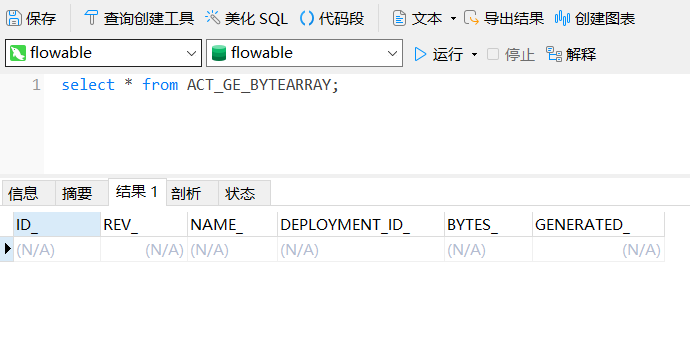
然后查看ACT_RE_DEPLOYMENT表,它记载了这次的部署行为: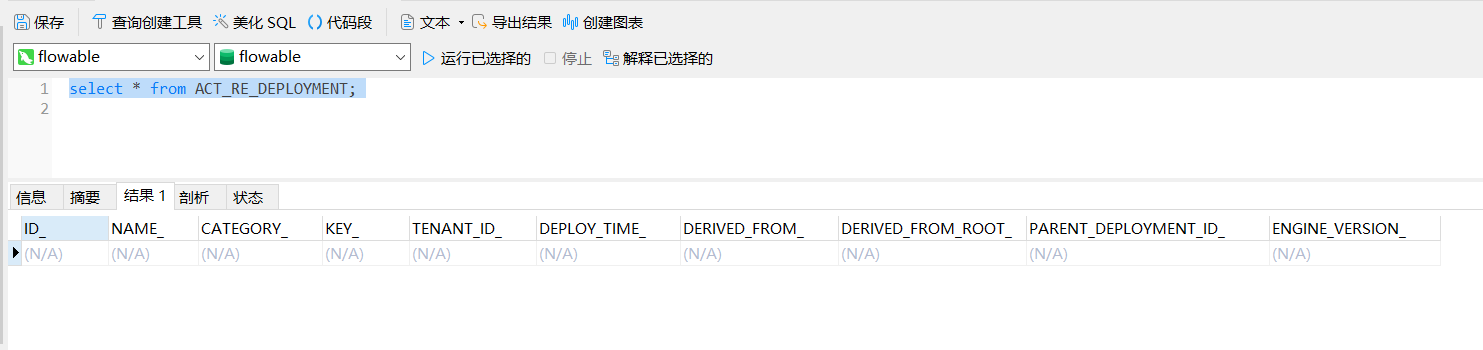
最后是查看ACT_RE_PROCDEF表,他记录了此次部署对应的流程定义信息: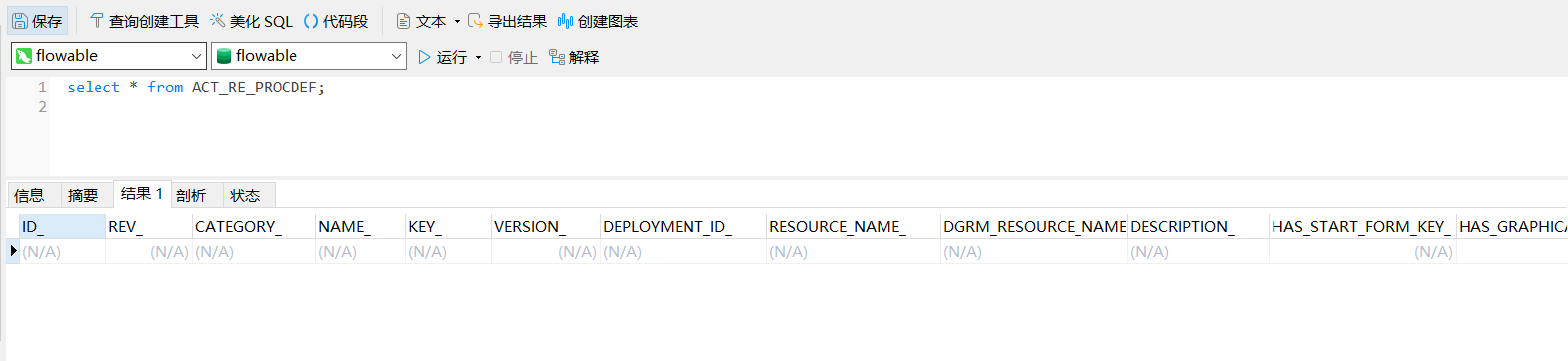
@RestController
@RequestMapping("/flowable")
public class FlowableController {
    @Resource
    private ProcessEngine processEngine;

    @PostMapping("/deployProcess")
    public String deployProcess() {
        RepositoryService repositoryService = processEngine.getRepositoryService();
        // 1,创建部署对象
        Deployment deployment = repositoryService.createDeployment()
                // 2.添加流程定义文件
                .addClasspathResource("process/leave.bpmn20.xml")
                // 3.设置流程名称
                .name("请假流程")
                // 4.部署
                .deploy();
	// 方法返回部署的key,key是我们画流程是创建流程的模型key
	// deployment.getKey();
       // 5.返回部署的流程id
        return deployment.getId();
    }
}通过postmain访问/flowable/deployProcess: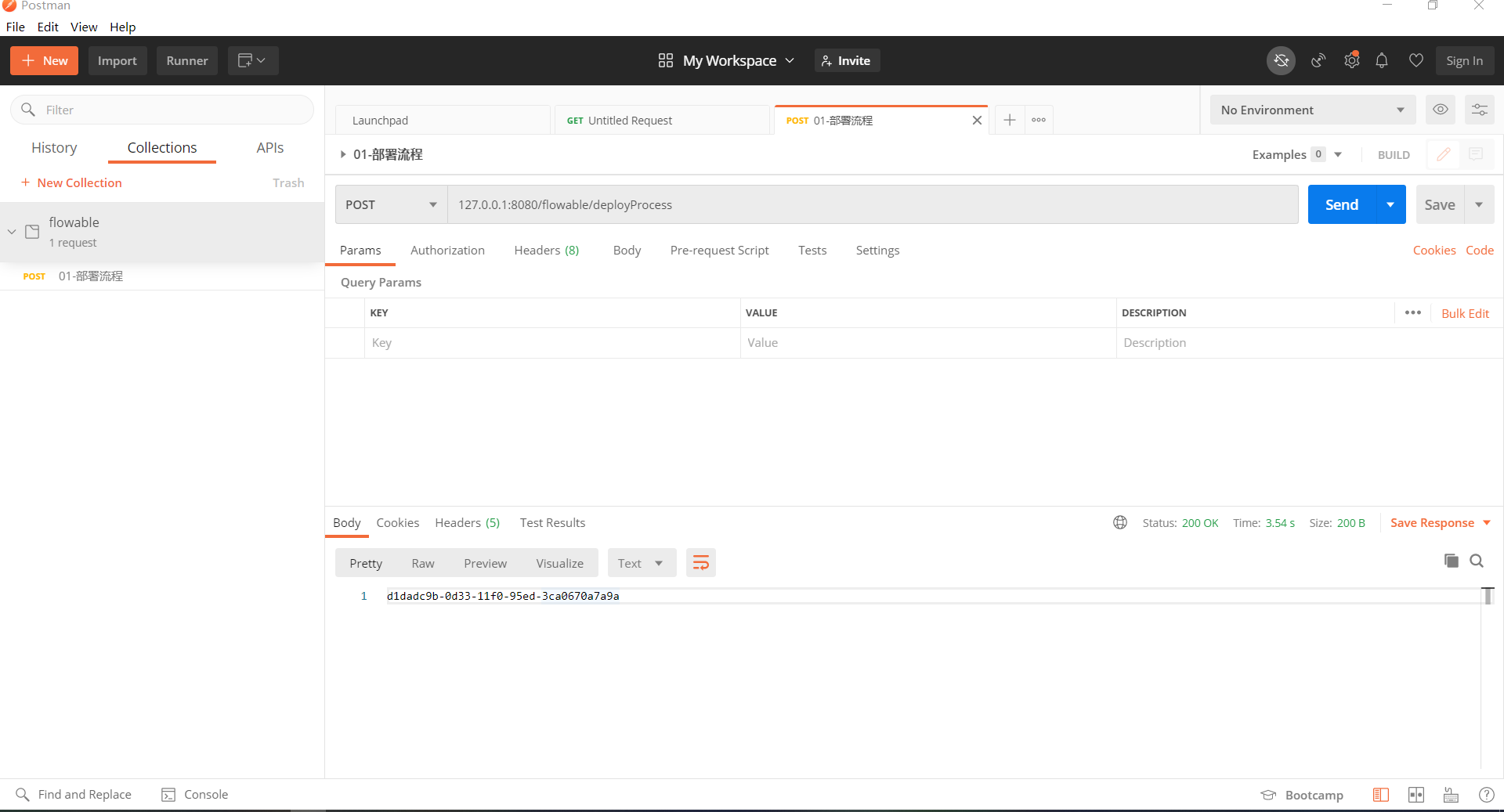
访问后注意这里获取是部署操作id不是流程定义id,然后查看ACT_GE_BYTEARRAY表,它记录了流程定义的资源信息,包含了xml和流程图的: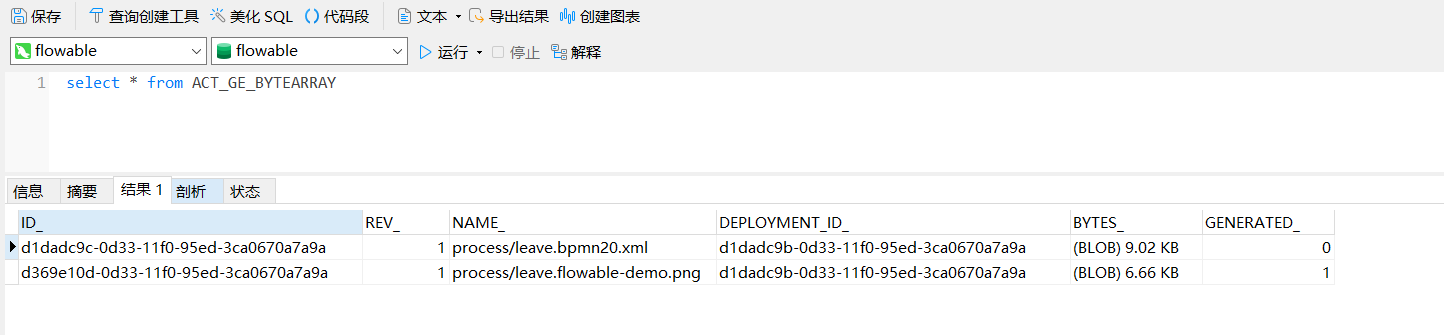
然后查看ACT_RE_DEPLOYMENT表,它记载了这次的部署行为: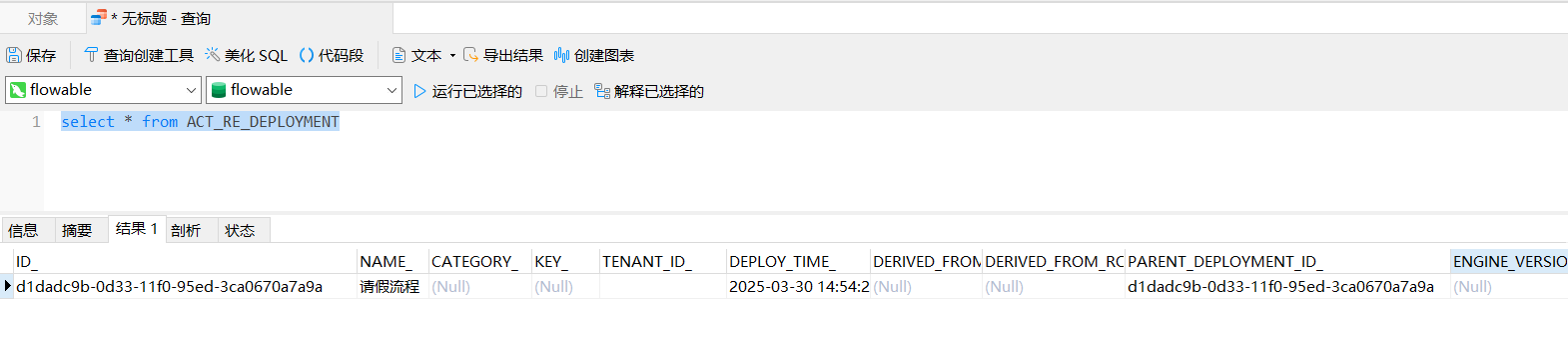
最后是查看ACT_RE_PROCDEF表,他记录了此次部署对应的流程定义信息: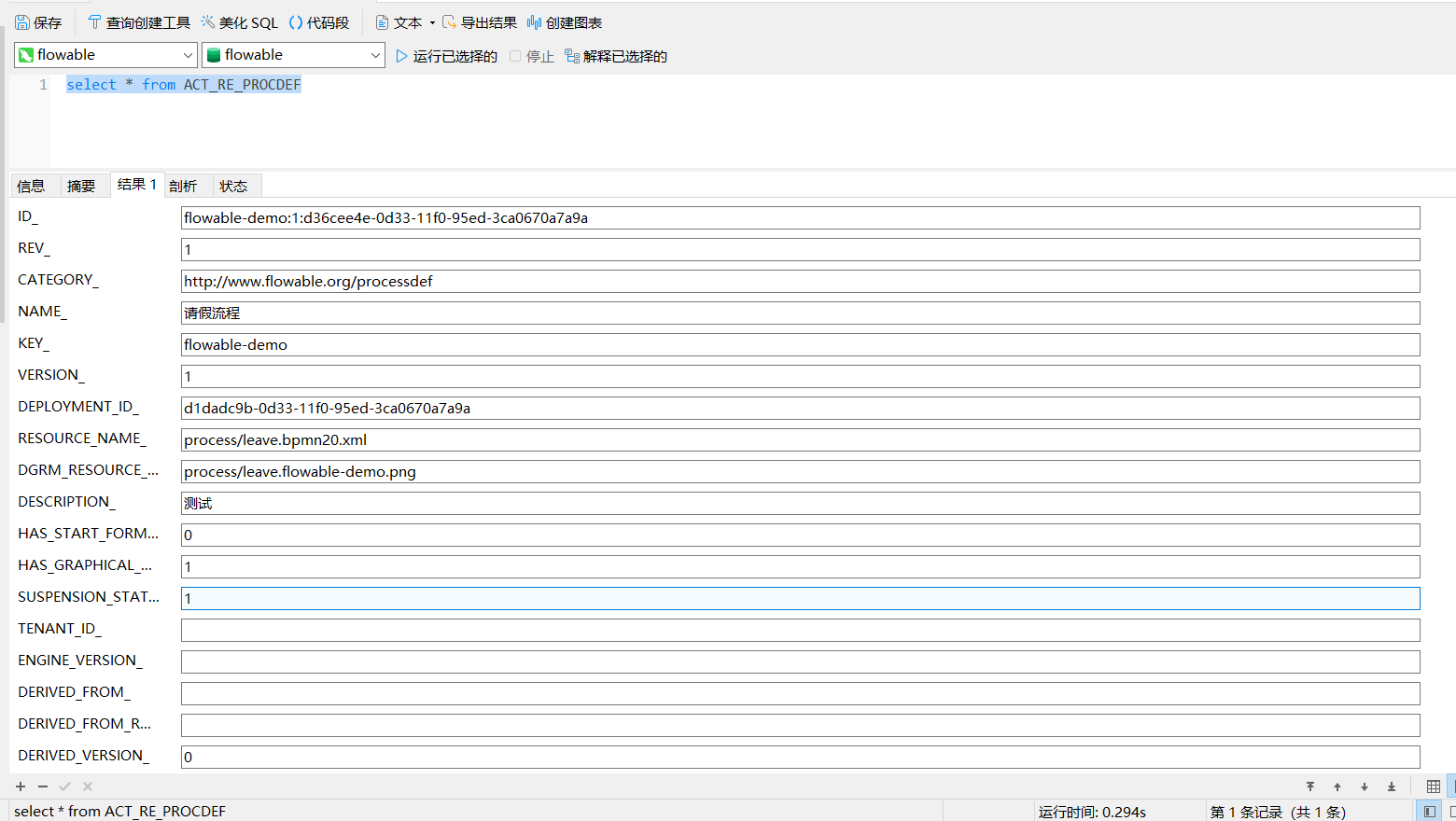
二,创建流程
流程部署成功后,就可以启动流程了,创建流程常用的有2个方法:
// 根据key启动
ProcessInstance processInstance = runtimeService.startProcessInstanceByKey(processDefKey);
// 根据id启动
ProcessInstance processInstance = runtimeService.startProcessInstanceById(processDefId);在这里需要说明下启动流程有两个方法,分别是通过processDefKey和processDefId。它们的区别就是processDefId是由引擎维护的,而processDefKey是由我们自己维护的,processDefKey是我们画流程是创建流程的模型key,部署流程的时候可以通过deployment.getKey()方法获取,不过推荐是用id启用流程实例,下面我主要介绍processDefId的获取方式:
场景模拟:假设学员zyh,先查看能发起那些流程,调用/flowable/findProcessDefinitionList接口创建流程:
@RestController
@RequestMapping("/flowable")
public class FlowableController {
    @Resource
    private ProcessEngine processEngine;

    @PostMapping("/findProcessDefinitionList")
    public List<Map<String,Object>> findProcessDefinitionList() {
        RepositoryService repositoryService = processEngine.getRepositoryService();
        // 查询部署的流程
        return repositoryService.createProcessDefinitionQuery()
                .list().stream().map(e-> {
                    Map<String,Object>  processDefinition = new HashMap<String,Object>(9);
                    processDefinition.put("processDefId",e.getId());
                    processDefinition.put("processDefKey",e.getKey());
                    processDefinition.put("version",e.getVersion());
                    processDefinition.put("deploymentId",e.getDeploymentId());
                    processDefinition.put("name",e.getName());
                    return processDefinition;
                }).collect(Collectors.toList());
    }
}
返回结果: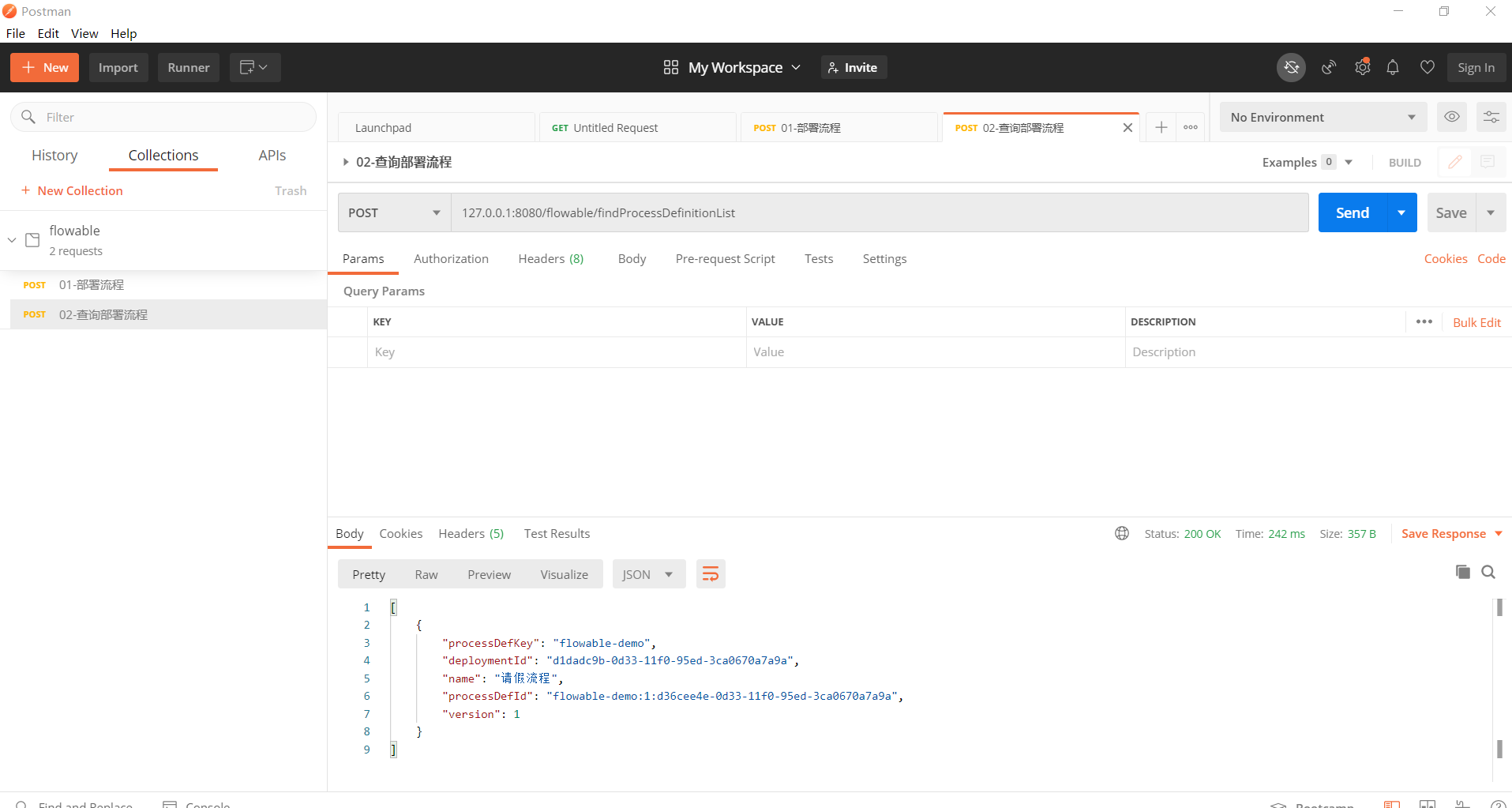
由返回结果可以看出processDefId = processDefKey + ":" + version + " :" +deploymentId,获取到流程processDefId我们就可以启动/创建流程实例。
在测试启动/创建流程实例之前,可以先在ACT_RU_TASK表中看到是否有代办任务: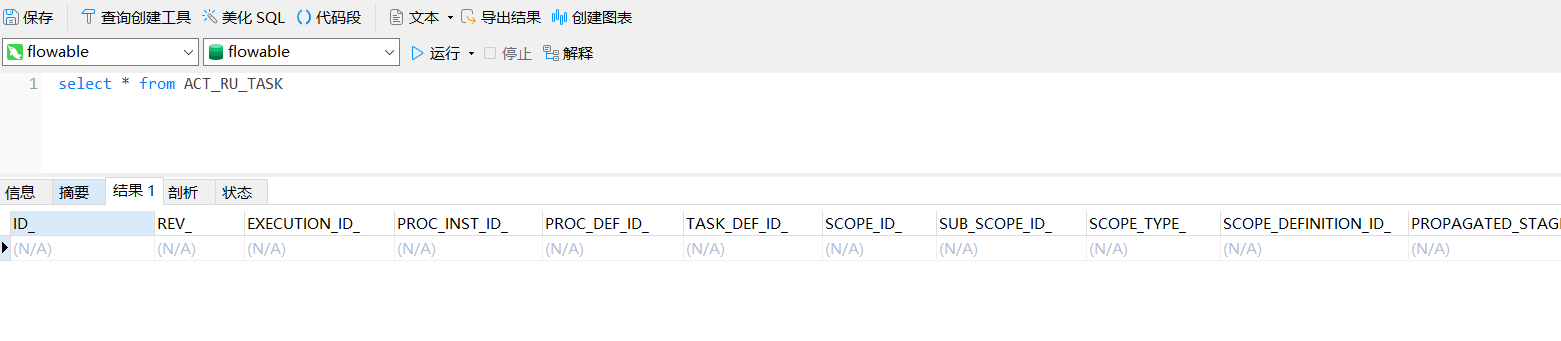
场景模拟:假设学员zyh,点击页面创建流程按钮,调用/flowable/startProcessById接口创建流程:
RestController
@RequestMapping("/flowable")
public class FlowableController {
    @Resource
    private ProcessEngine processEngine;

    @PostMapping("/startProcessById")
    public String startProcessById(@RequestParam("studentId") String studentId, @RequestParam("processDefId") String processDefId) {
        RuntimeService runtimeService = processEngine.getRuntimeService();
        // 设置流程变量
        Map<String,Object> variableMap = new HashMap<>(8);
        // 假设根据提交审批的学生查询到学生的辅导员id
        String teacherId = studentId+"-teacherId";
        // 假设根据提交审批的学生查询到学院的院长的账号id
        String deanId = studentId+"-deanId";
        // 设置流程变量
        variableMap.put("studentId",studentId);
        variableMap.put("teacherId",teacherId);
        variableMap.put("deanId",deanId);
        // 根据流程定义的id启动流程实例
        ProcessInstance processInstance = runtimeService.startProcessInstanceById(processDefId,variableMap);
        return processInstance.getId();
    }
}
这里的设置的流程变量studentId、teacherId、deanId是当时画流程图的时候,设置用户的分配人,对应流程图内容::
学员申请:
<userTask id="sid-33616FF3-C60C-45A0-B9B2-C31799F8EE37" name="学员申请" flowable:assignee="${studentId}" flowable:formFieldValidation="true">
  <extensionElements>
    <modeler:initiator-can-complete xmlns:modeler="http://flowable.org/modeler"><![CDATA[false]]></modeler:initiator-can-complete>
  </extensionElements>
</userTask>
辅导员审批:
<userTask id="sid-45C2B851-5CED-4D4D-8DFB-93BE3FE38310" name="辅导员审批" flowable:assignee="${teacherId}" flowable:formFieldValidation="true">
  <extensionElements>
    <modeler:initiator-can-complete xmlns:modeler="http://flowable.org/modeler"><![CDATA[false]]></modeler:initiator-can-complete>
  </extensionElements>
</userTask>
院长审批:
<userTask id="sid-04ACDBA8-3907-4E6B-9A7B-A650A489ADC1" name="院长审批" flowable:assignee="${deanId}" flowable:formFieldValidation="true">
  <extensionElements>
    <modeler:initiator-can-complete xmlns:modeler="http://flowable.org/modeler"><![CDATA[false]]></modeler:initiator-can-complete>
  </extensionElements>
</userTask>通过postmain访问/flowable/startProcessById: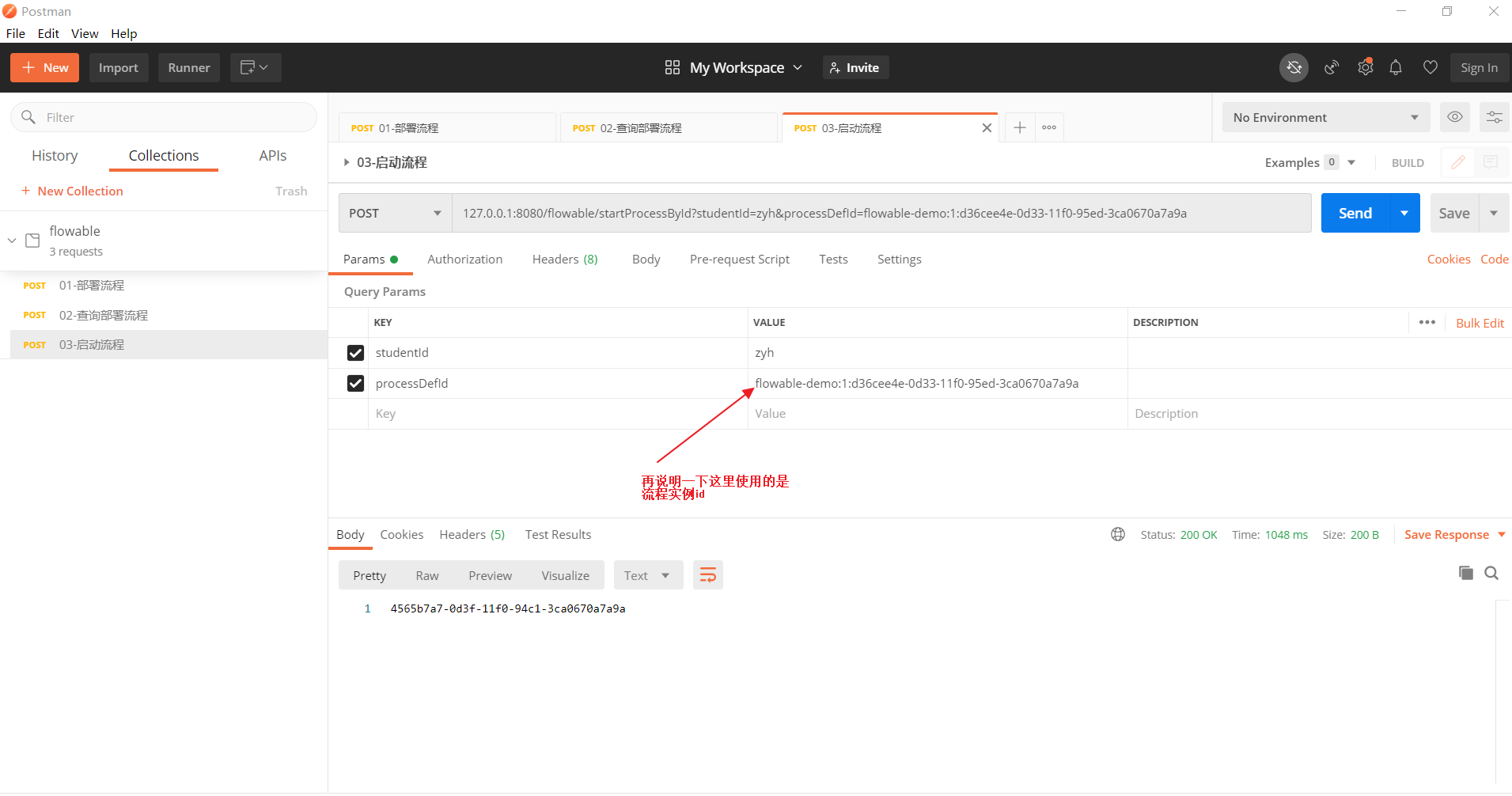
我们也可以在ACT_RU_TASK表中看到当前流程走到那个节点: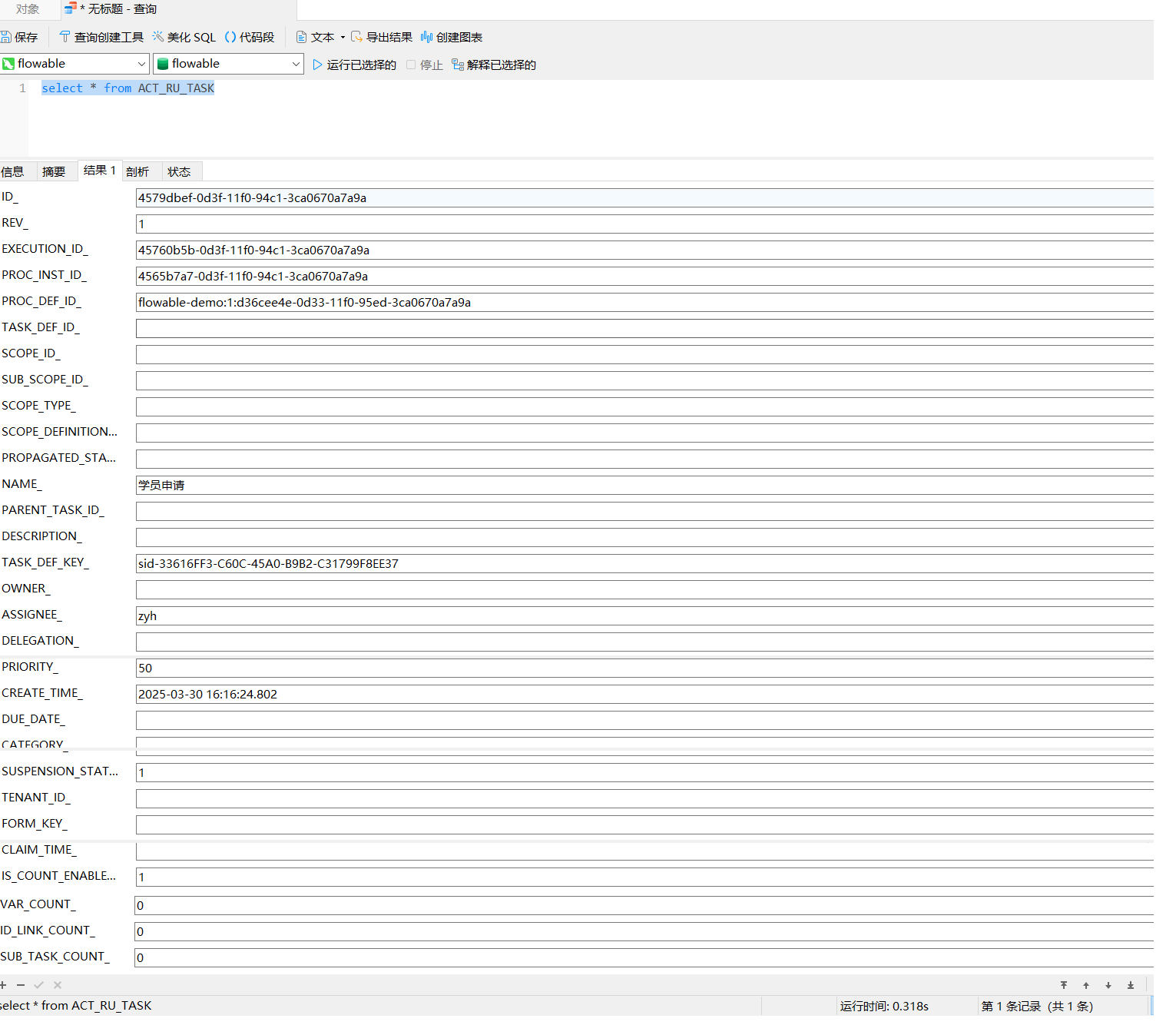
在ACT_RU_VARIABLE表中看到设置的流程变量: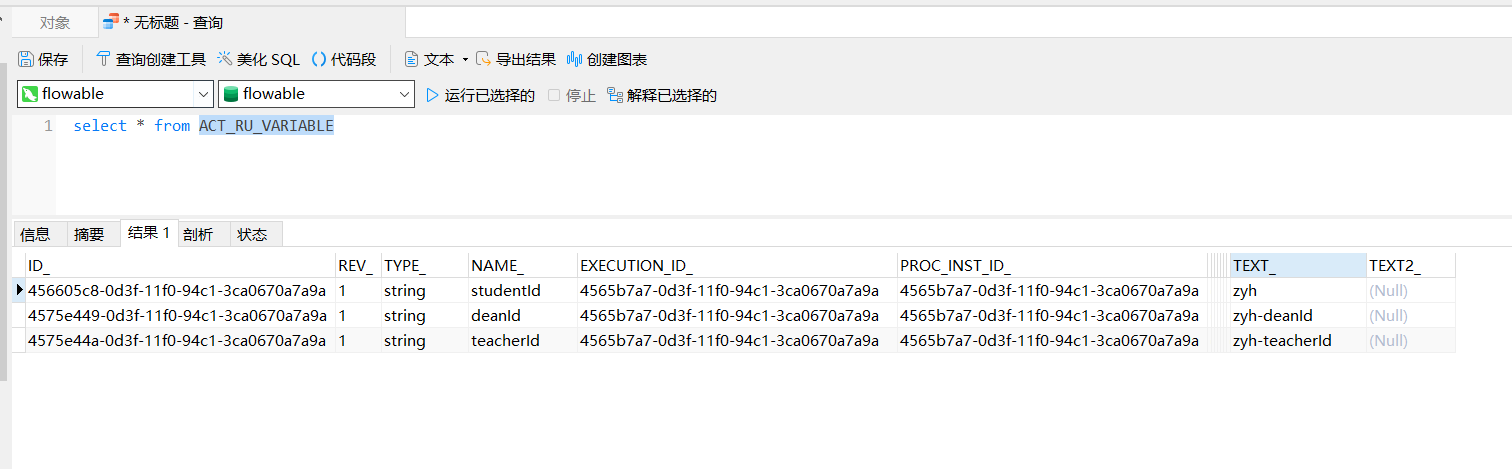
补充一个接口,访问/flowable/showProcessPic看到流程执行到那个节点(这个接口的代码放到文章后面的资源中了):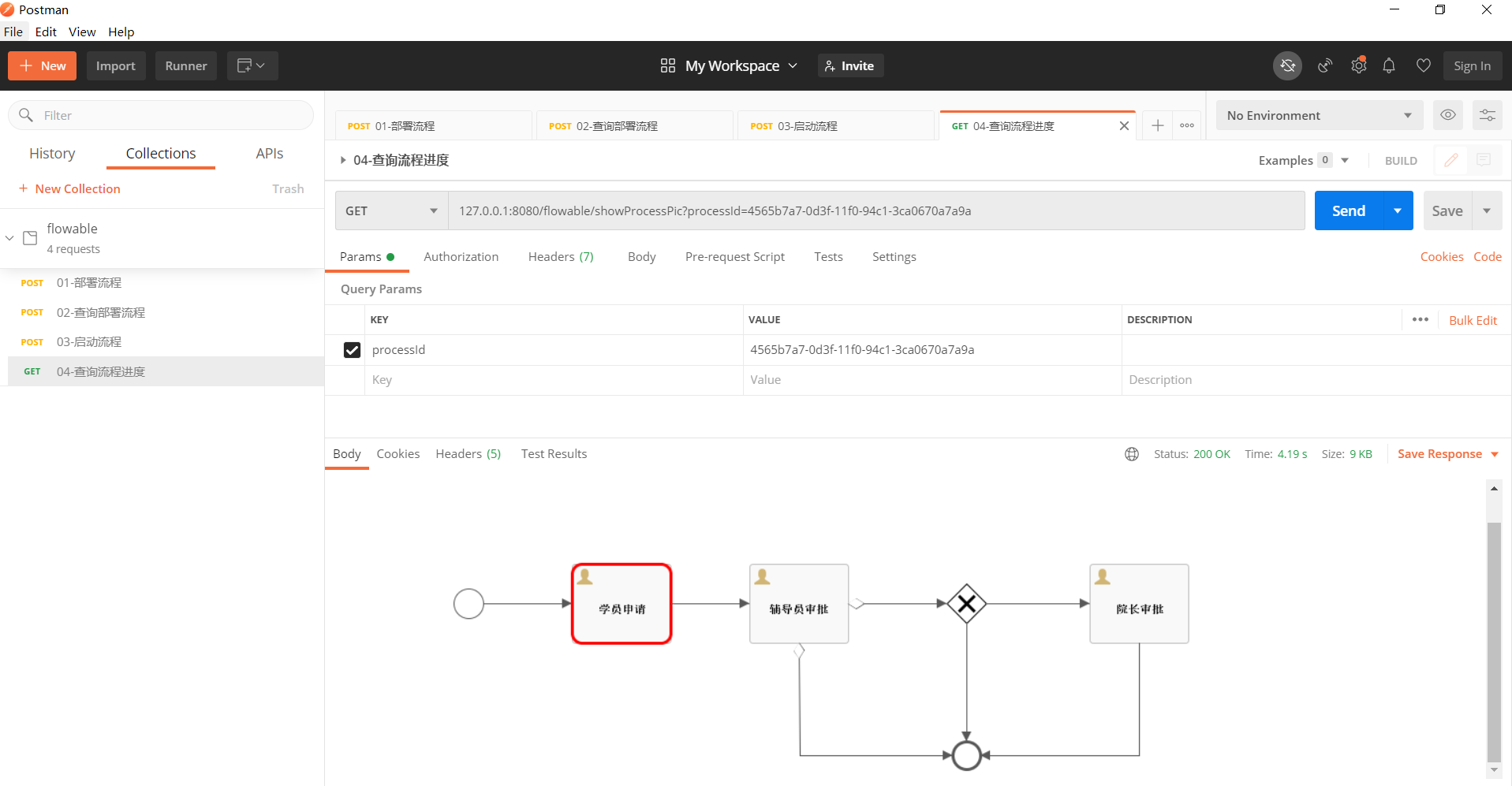
三,流程审批
流程启动完成后,可以通过如下方法查看代办任务:
@RequestMapping("/flowable")
public class FlowableController {
    @Resource
    private ProcessEngine processEngine;

    @PostMapping("/findTask")
    public List<Map<String,Object>> findTask(@RequestParam("assigneeId") String assigneeId) {
        TaskService taskService = processEngine.getTaskService();
        return taskService.createTaskQuery()
                .taskAssignee(assigneeId)
                .list().stream()
                 .map(e->{
                     Map<String,Object>  taskInfoMap = new HashMap<String,Object>(9);
                     taskInfoMap.put("taskId",e.getId());
                     taskInfoMap.put("taskName",e.getName());
                     taskInfoMap.put("processId",e.getProcessInstanceId());
                     taskInfoMap.put("processDefId",e.getProcessDefinitionId());
                     return taskInfoMap;
                 })
                 .collect(Collectors.toList());
    }
}
3.1 学员申请
在测试学员申请前,我们可以先访问/flowable/showProcessPic看到流程执行到那个节点:
我们也可以在ACT_RU_TASK表中看到当前流程走到那个节点:
场景模拟:假设学员zyh,点击页面创建流程按钮,调用/flowable/startProcessById接口创建流程,然后调用/flowable/findTask接口获取学员zyh的代办任务: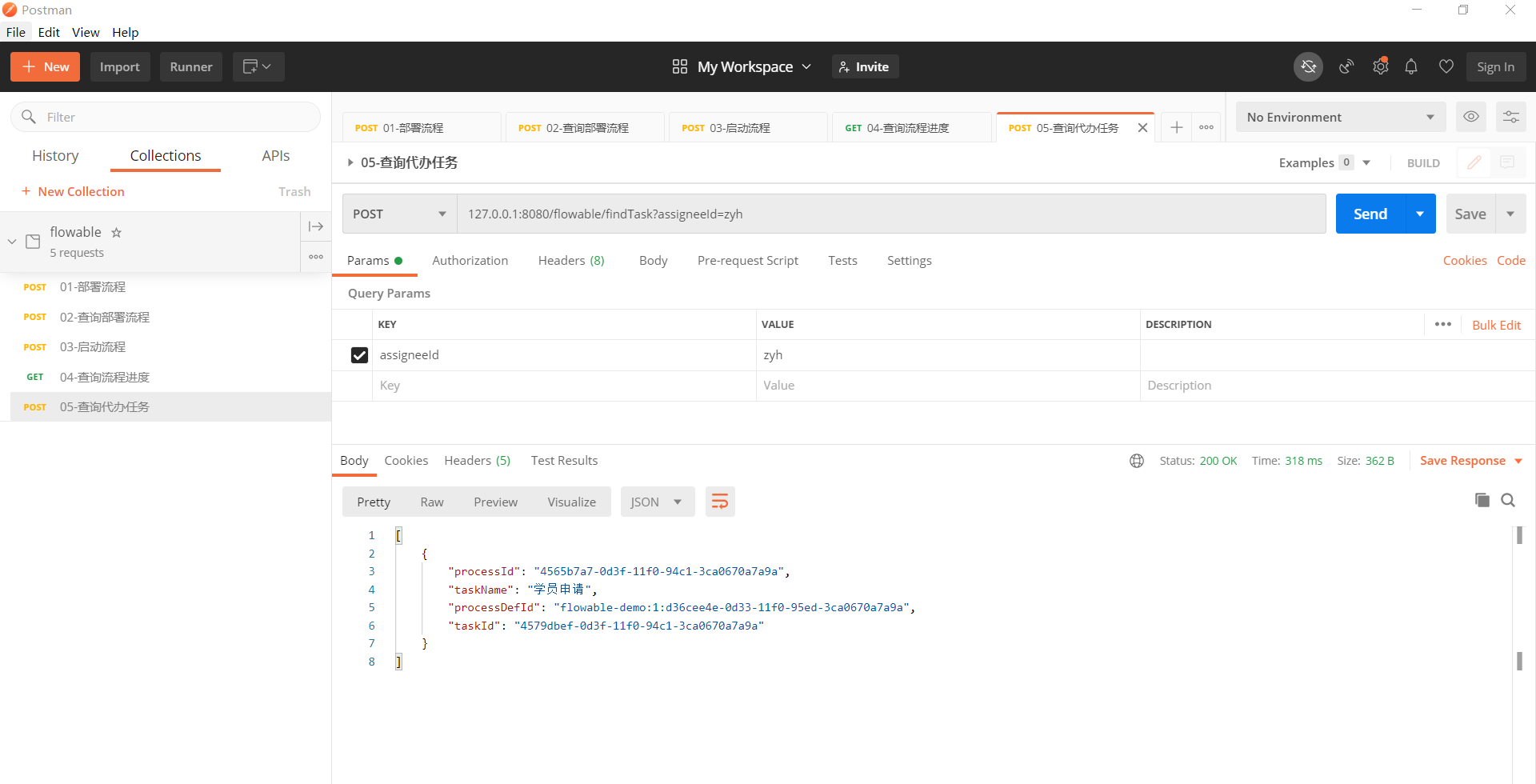
然后根据代办任务和创建流程的id筛选出任务,然后根据任务渲染出请假表单填写页面,填写请假天数和备注信息然后点击提交按钮调用/flowable/studentTask提交请假。
@RestController
@RequestMapping("/flowable")
public class FlowableController {
    @Resource
    private ProcessEngine processEngine;

    @PostMapping("/studentTask")
    public String studentTask(@RequestParam("processId") String processId
            ,@RequestParam("taskId") String taskId
            , @RequestParam("day") Integer day
            , @RequestParam("memo") String memo) {
        // 假设学员请假:创建完流程后,填写的请假表单
        RuntimeService runtimeService = processEngine.getRuntimeService();
        runtimeService.setVariable(processId, "day", day);
        runtimeService.setVariable(processId, "memo", memo);
        // 完成任务
        TaskService taskService = processEngine.getTaskService();
        taskService.complete(taskId);
        return "success";
    }
}
这里的需要设置的流程变量day,是当时画流程图的时候定义的,用于判断是否需要院长审批,对应流程图内容::
<sequenceFlow id="sid-F692009D-AFC6-48D9-85B1-FA6DE3EBD4DB" name="大于3天" sourceRef="sid-487A7C7C-6C61-42F9-A75C-32B9D140B11C" targetRef="sid-04ACDBA8-3907-4E6B-9A7B-A650A489ADC1">
  <conditionExpression xsi:type="tFormalExpression"><![CDATA[${day > 3}]]></conditionExpression>
</sequenceFlow>
<sequenceFlow id="sid-BEAF4EBE-81ED-4D5F-9231-7635AC2D2A62" name="小于等于3天" sourceRef="sid-487A7C7C-6C61-42F9-A75C-32B9D140B11C" targetRef="sid-EE8A6DF8-7002-4482-A6A3-9DC3A7550B78">
  <conditionExpression xsi:type="tFormalExpression"><![CDATA[${day <= 3}]]></conditionExpression>
</sequenceFlow>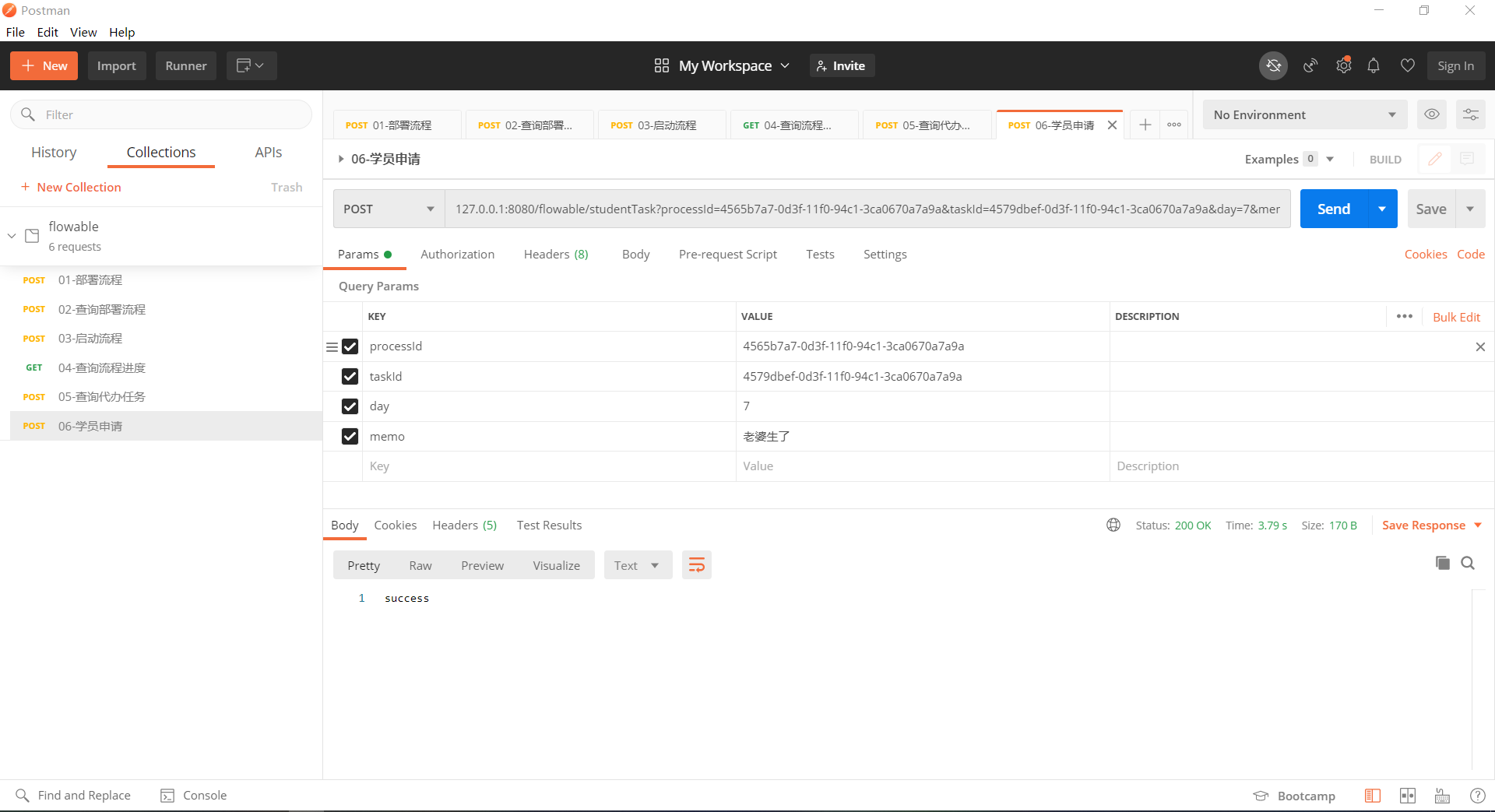
然后我们可以先访问/flowable/showProcessPic在看到流程执行到那个节点: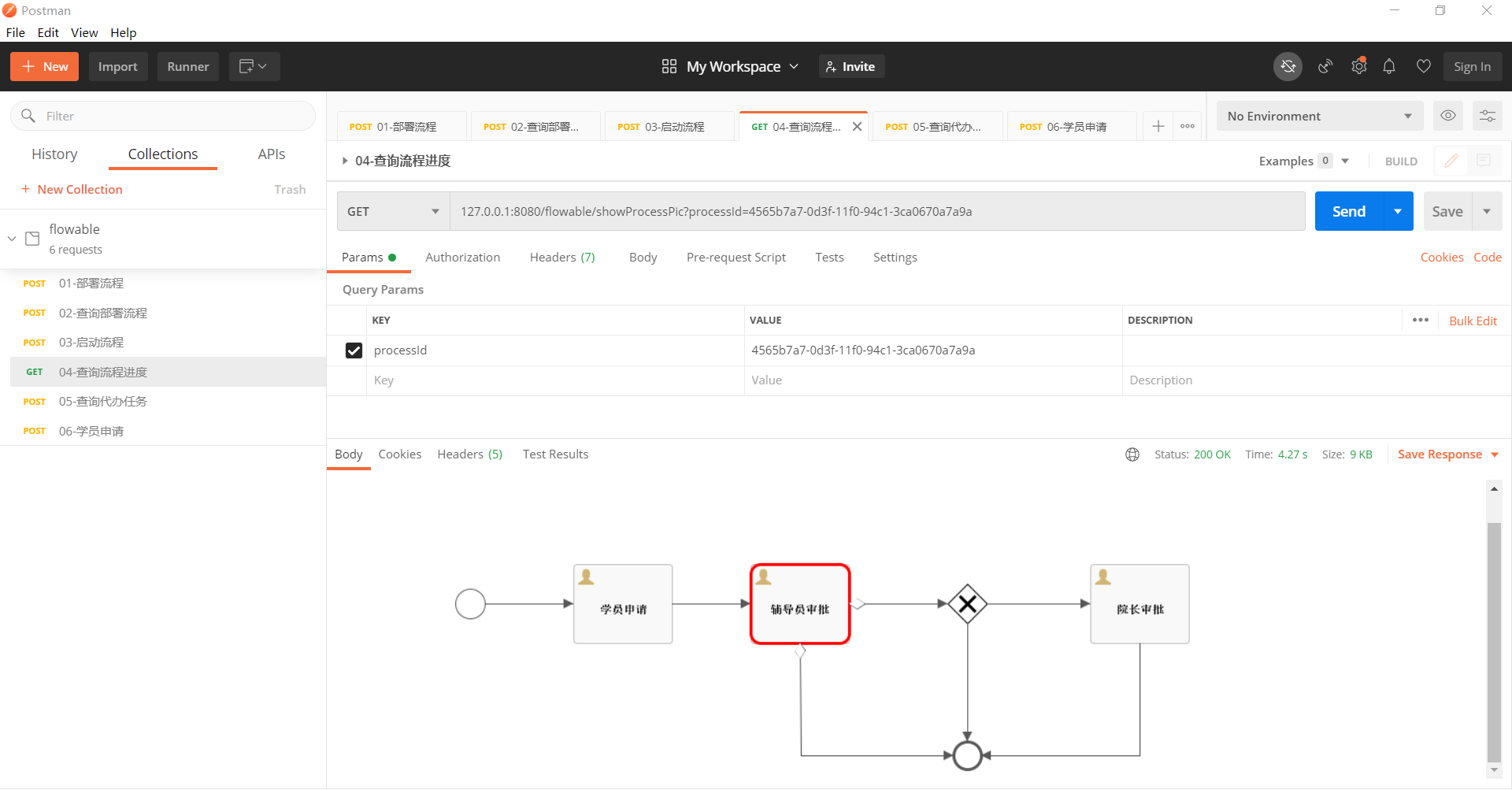
我们也可以在ACT_RU_TASK表中看到当前流程走到辅导员(zyh-teacherId)审批节点,且这个表中学员(zyh)的待办任务没了: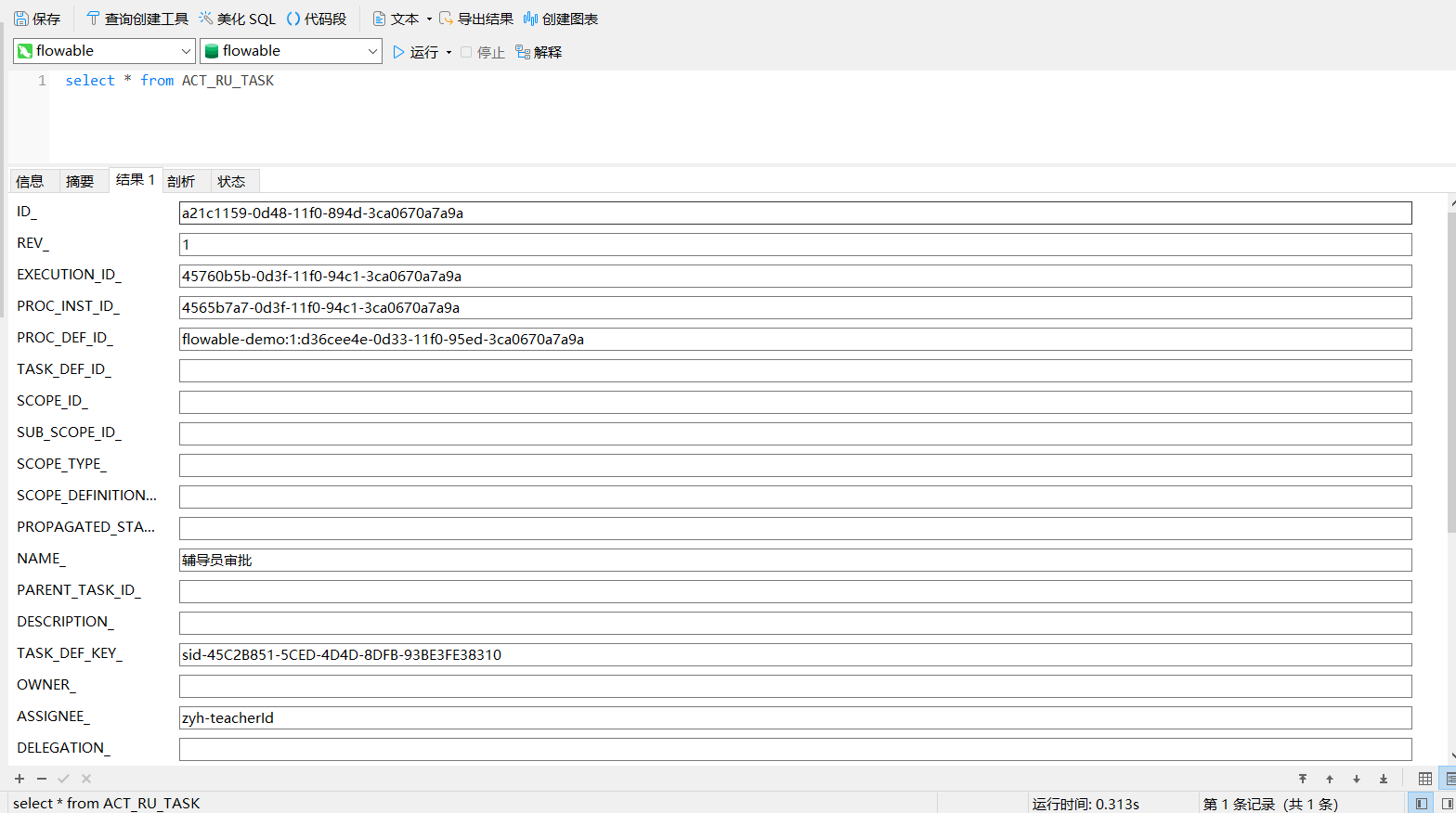
在ACT_RU_VARIABLE表中看到设置的流程变量多了两个请假天数和原因: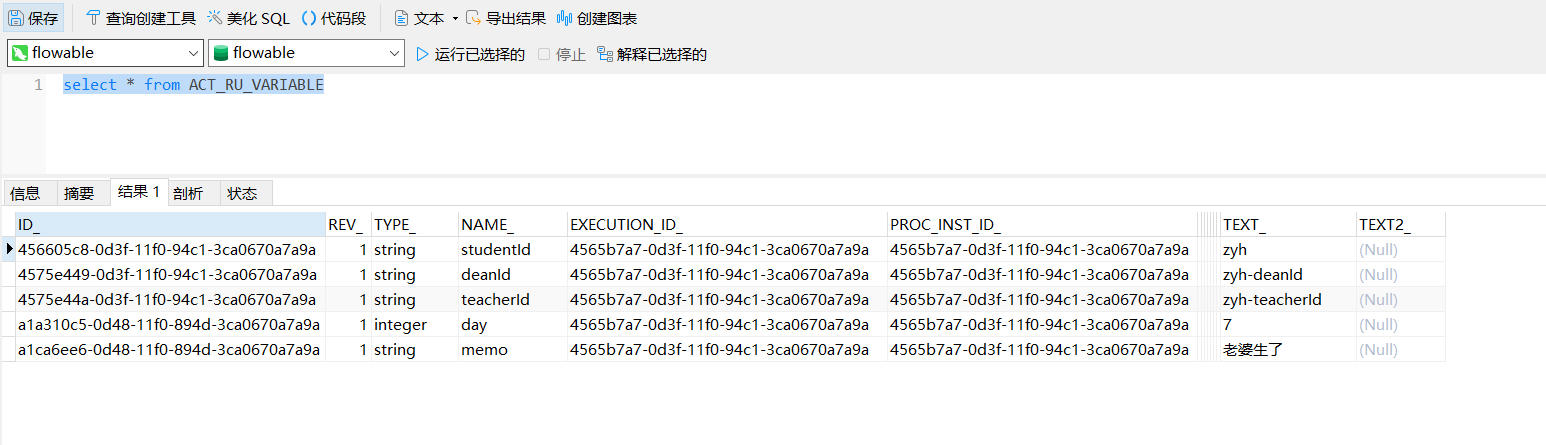
学员(zyh)的待办任务到哪里了呢,在ACT_HI_ACTINST表中查询到这个流程实例的过程记录: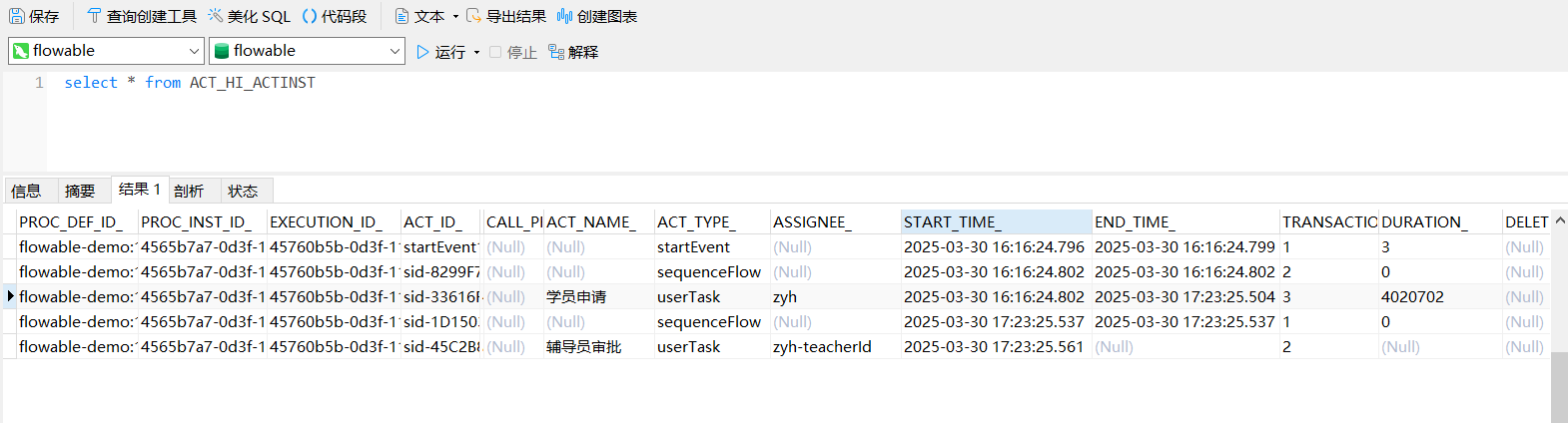
这个里可以看出学员(zyh)开始任务和完成任务的时间,辅导员(zyh-teacherId)的已经开始了,还没完成。
3.2 辅导员审批
场景模拟:假设辅导员zyh-teacherId登陆系统,调用/flowable/findTask接口获取辅导员zyh-teacherId的代办列表: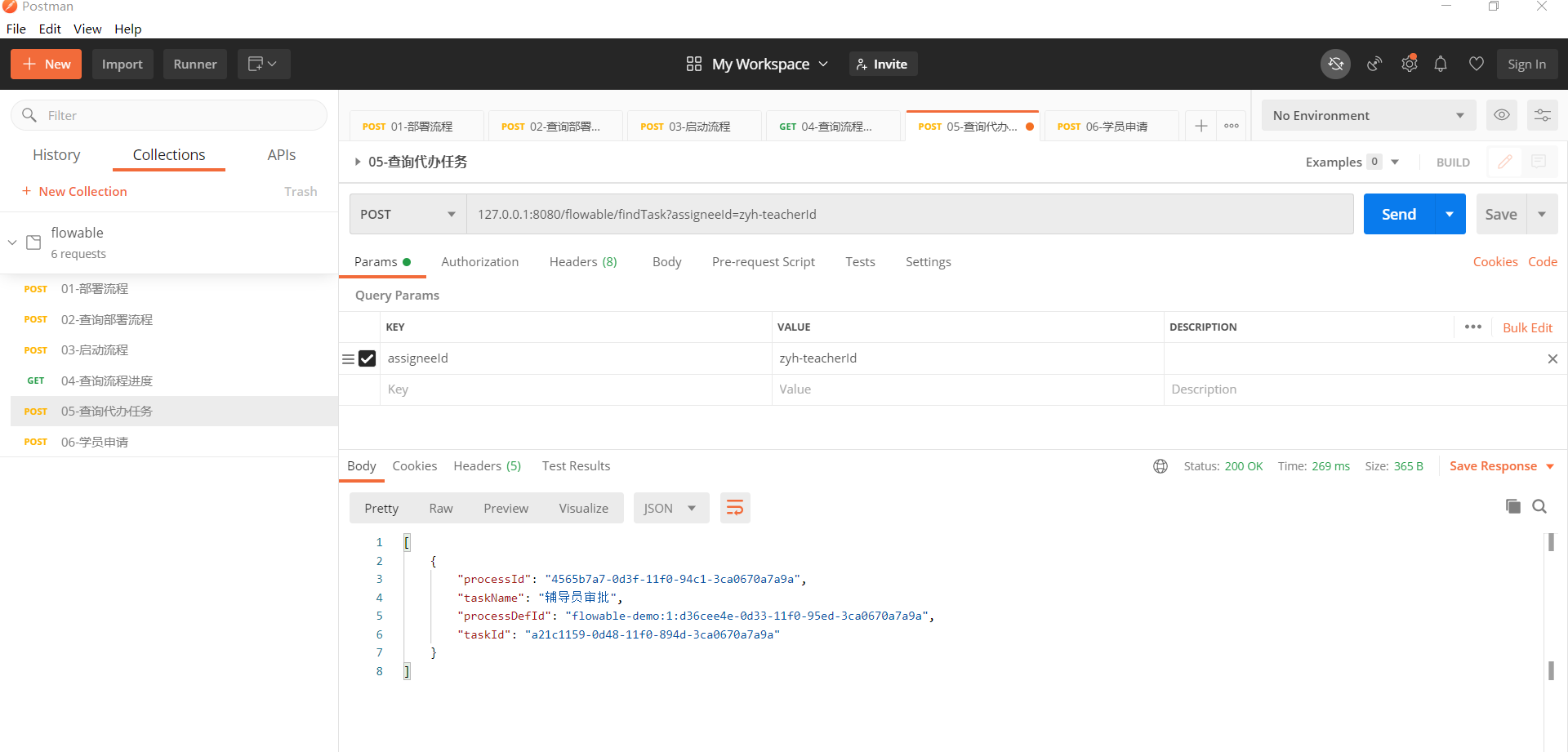
找到学员zyh的请假申请,然后填写审批意见:
@RestController
@RequestMapping("/flowable")
public class FlowableController {
    @Resource
    private ProcessEngine processEngine;
    @PostMapping("/teacherTask")
    public String teacherTask(@RequestParam("processId") String processId
            , @RequestParam("taskId") String taskId
            , @RequestParam("agree") String agree
            , @RequestParam("opinion") String opinion) {
        // 假设辅导员审批:填写审批意见
        RuntimeService runtimeService = processEngine.getRuntimeService();
        runtimeService.setVariable(processId,"agree",agree);
        runtimeService.setVariable(processId,"opinion",opinion);
        // 完成任务
        TaskService taskService = processEngine.getTaskService();
        taskService.complete(taskId);
        return "success";
    }
}
这里的设置的流程变量agree是当时画流程图的时候,用于判断是辅导员是否同意,对应流程图内容:
<sequenceFlow id="sid-A144F659-6142-47BA-B1CB-D0B160CDE7B1" name="不同意" sourceRef="sid-45C2B851-5CED-4D4D-8DFB-93BE3FE38310" targetRef="sid-EE8A6DF8-7002-4482-A6A3-9DC3A7550B78">
  <conditionExpression xsi:type="tFormalExpression"><![CDATA[${agree == 'NO'}]]></conditionExpression>
</sequenceFlow>
<sequenceFlow id="sid-ACBDDAFC-BC4F-4C0E-A691-5D88722F0FB4" name="同意" sourceRef="sid-45C2B851-5CED-4D4D-8DFB-93BE3FE38310" targetRef="sid-487A7C7C-6C61-42F9-A75C-32B9D140B11C">
  <conditionExpression xsi:type="tFormalExpression"><![CDATA[${agree == 'YES'}]]></conditionExpression>
</sequenceFlow>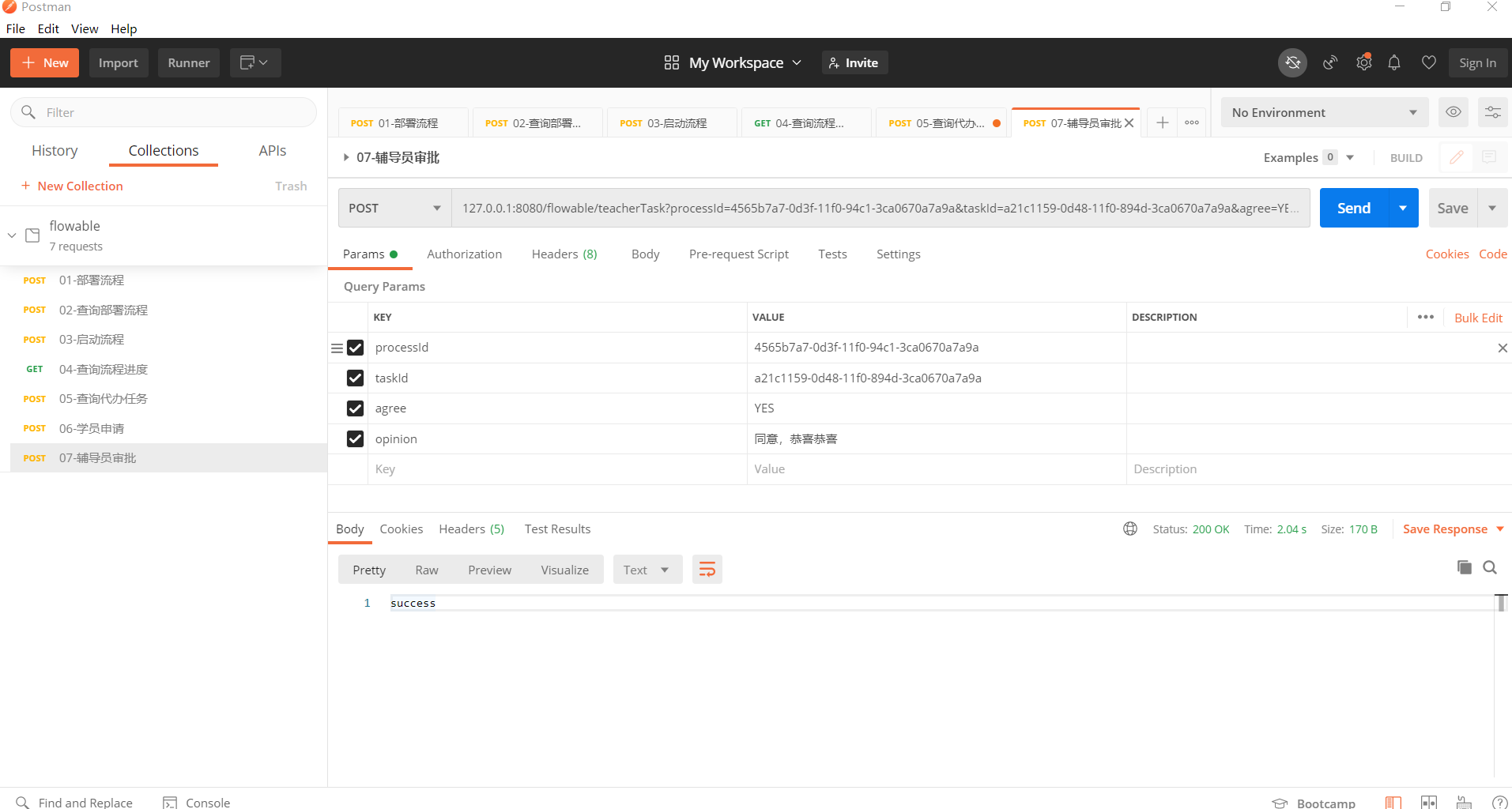
当辅导员调用完taskService.complete(taskId)方法后,我们可以先访问/flowable/showProcessPic看到流程执行到院长审批节点: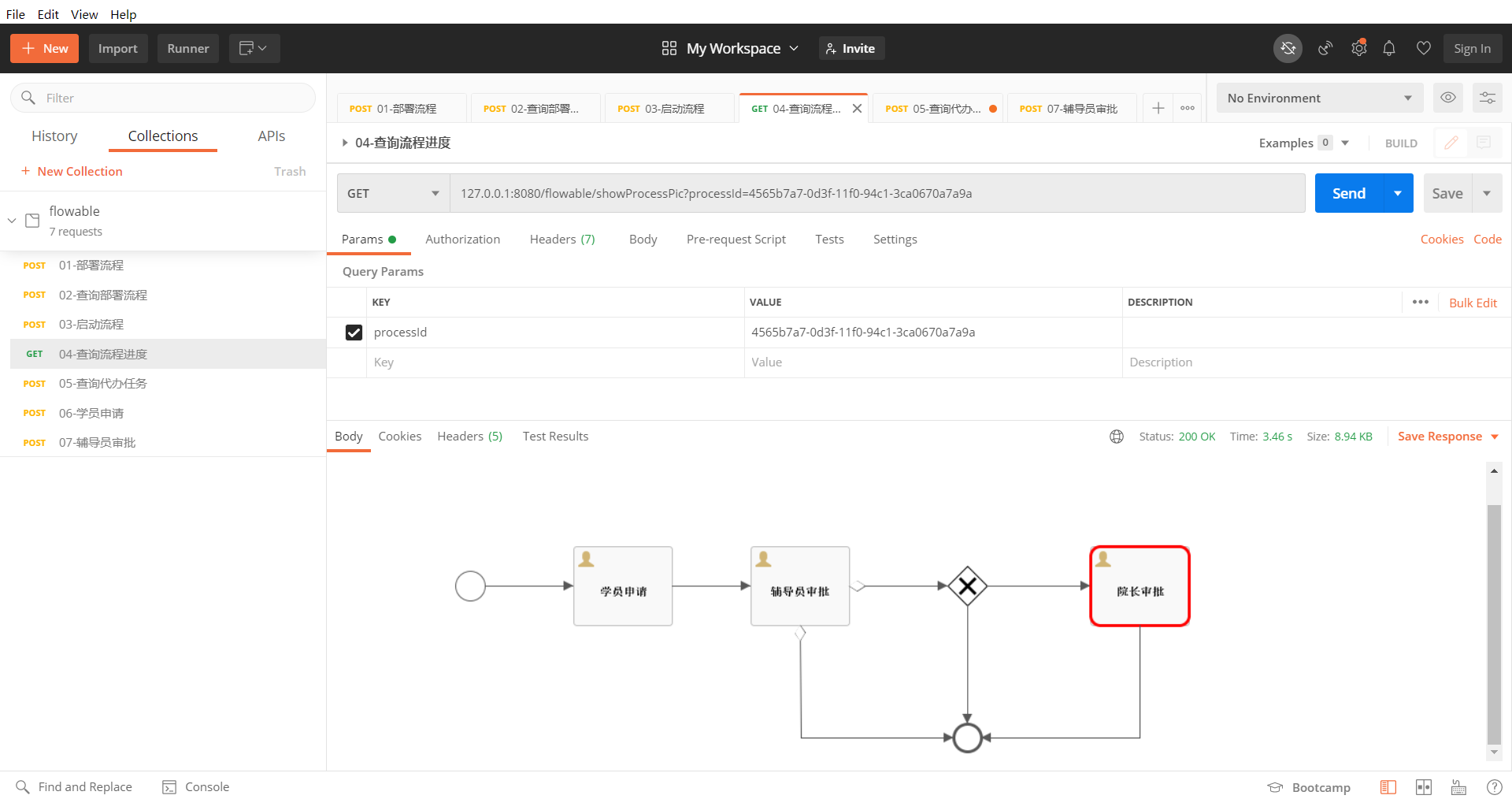
我们也可以在ACT_RU_TASK表中看到当前流程走到辅导员(zyh-deanId)审批节点,且这个表中辅导员(zyh-teacherId)的待办任务没了: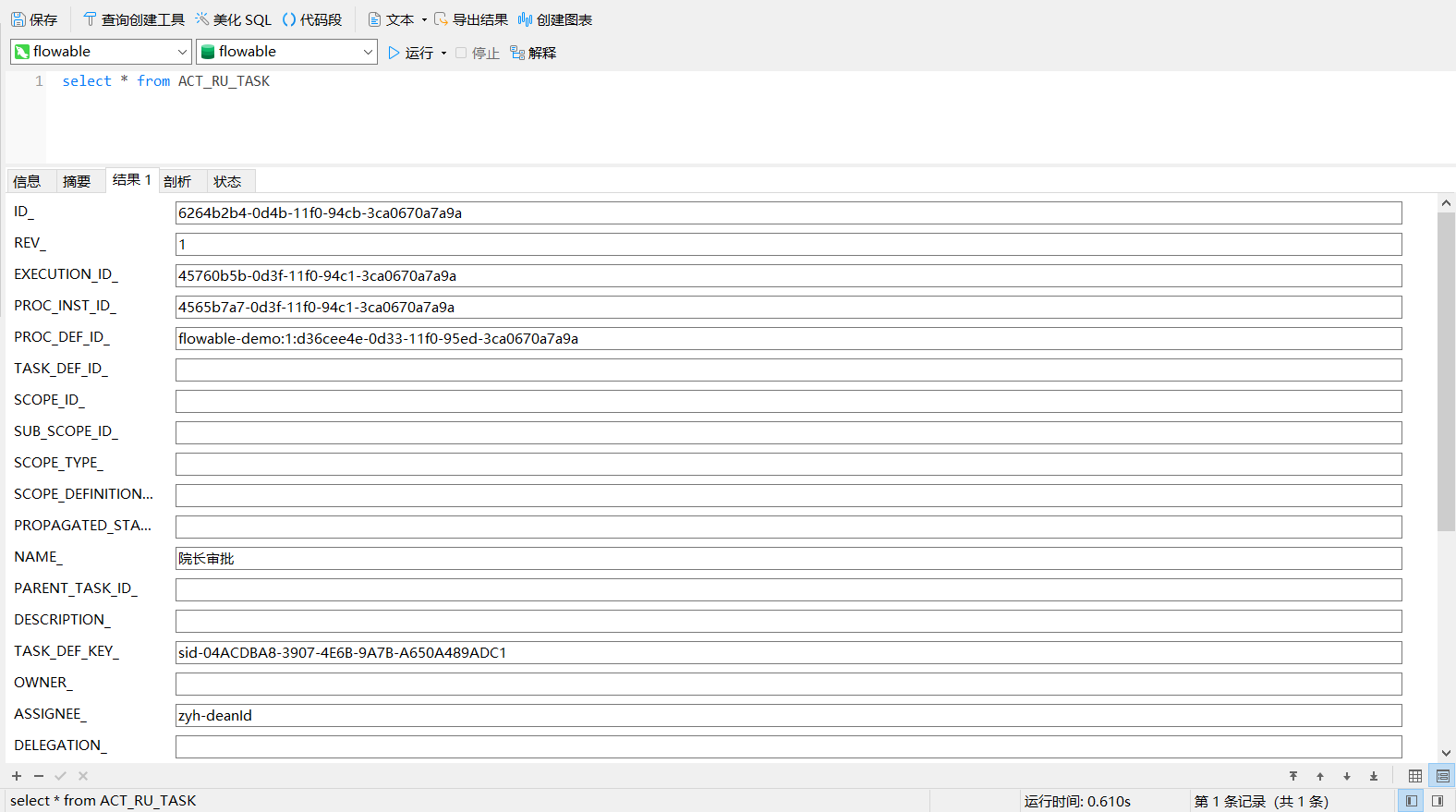
同样的辅导员(zyh-teacherId)的待办任务,也可以在ACT_HI_ACTINST表中查询到,这个流程实例的过程记录: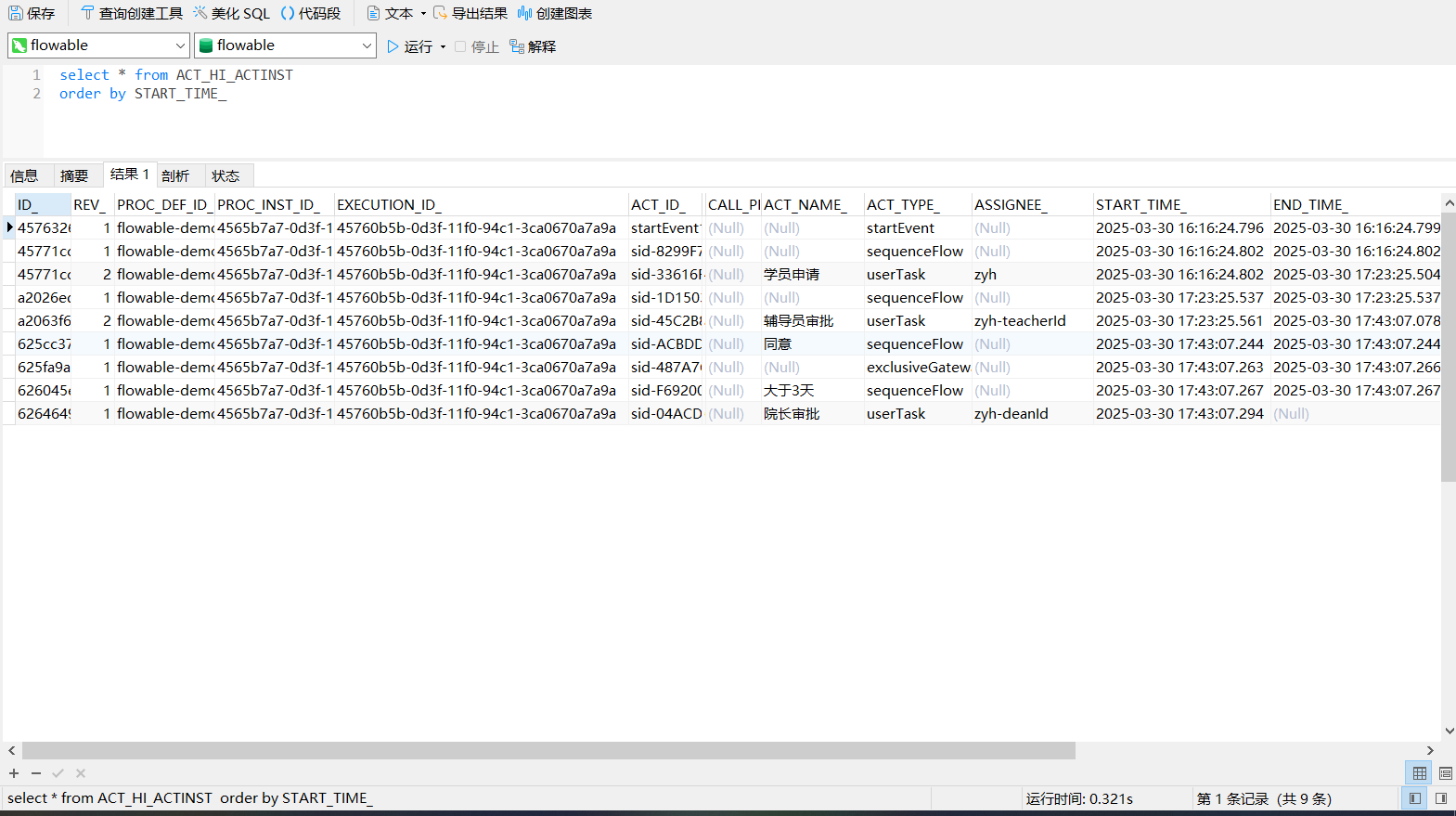
这个里可以看出辅导员(zyh-teacherId)开始任务和完成任务的时间,然后系统判断请假天数大于3天,走到了院长审批节点(zyh-deanId)的已经开始了,还没完成。
3.3 院长审批
场景模拟:辅导员审批通过且学员申请的天数 大于 3,就会到院长审批节点,院长zyh-deanId登陆系统,调用/flowable/findTask接口获取院长zyh-deanId的代办列表: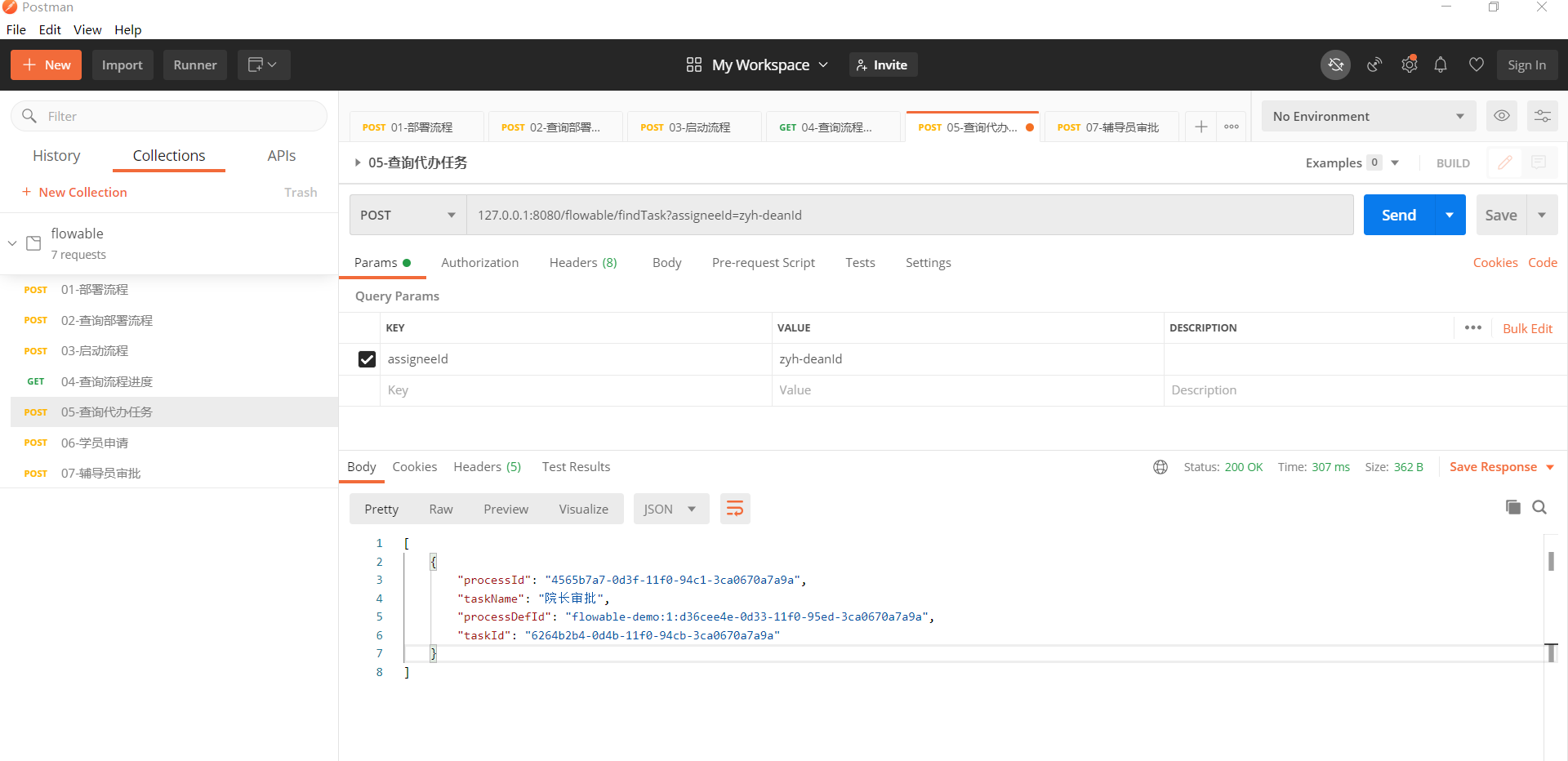
找到学员zyh的请假申请,然后填写审批意见:
@RestController
@RequestMapping("/flowable")
public class FlowableController {
    @Resource
    private ProcessEngine processEngine;
    @PostMapping("/deanTask")
    public String deanTask(@RequestParam("processId") String processId
            , @RequestParam("taskId") String taskId
            ,@RequestParam("result") String result) {
        // 假设院长审批:填写审批意见
        RuntimeService runtimeService = processEngine.getRuntimeService();
        runtimeService.setVariable(processId,"result",result);
        // 完成任务
        TaskService taskService = processEngine.getTaskService();
        taskService.complete(taskId);
        return "success";
   }
}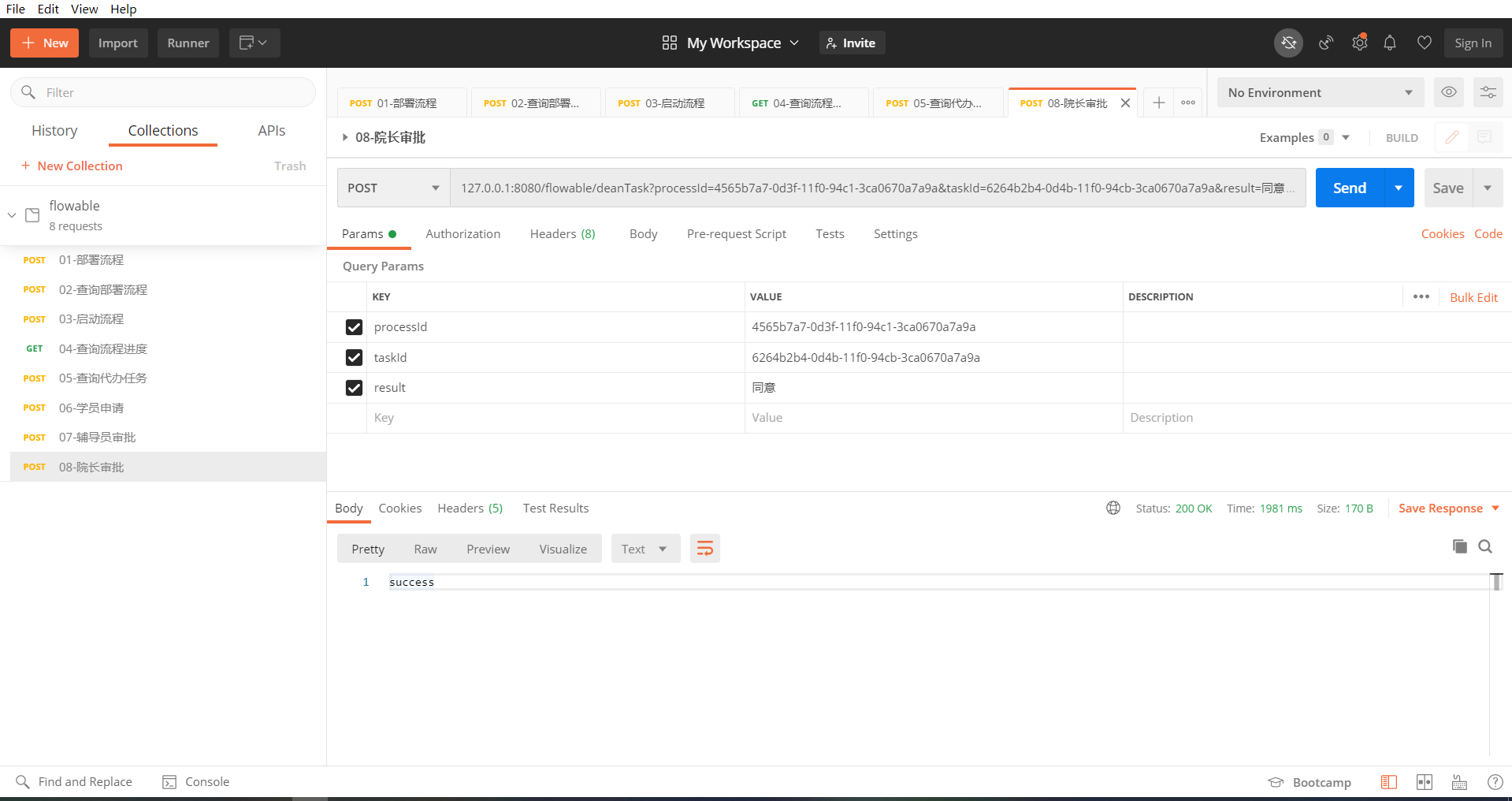
院长审批完成流程也就结束了,我们可以ACT_RU_TASK表中看到当前流程走到院长(zyh-deanId)的待办任务也没了,到此学员(zyh)的请假流程就结束:
在ACT_RU_VARIABLE表中看到设置的流程变量都没: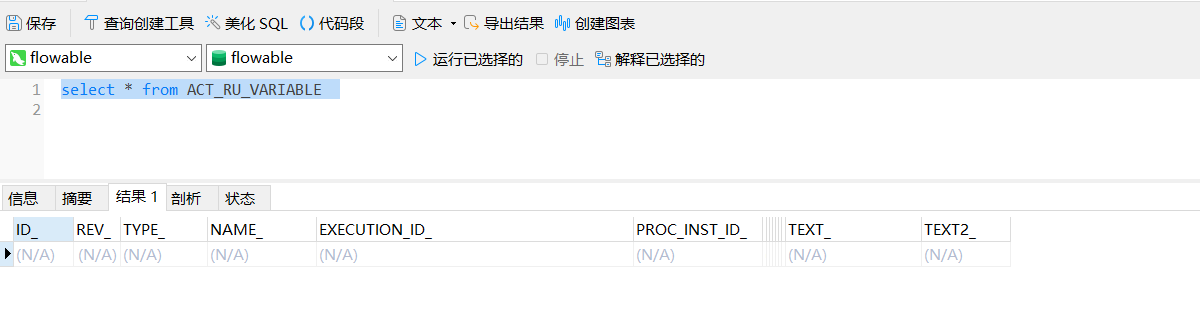
设置的流程变量在流程走完后就会保存在ACT_HI_VARINST这张表中: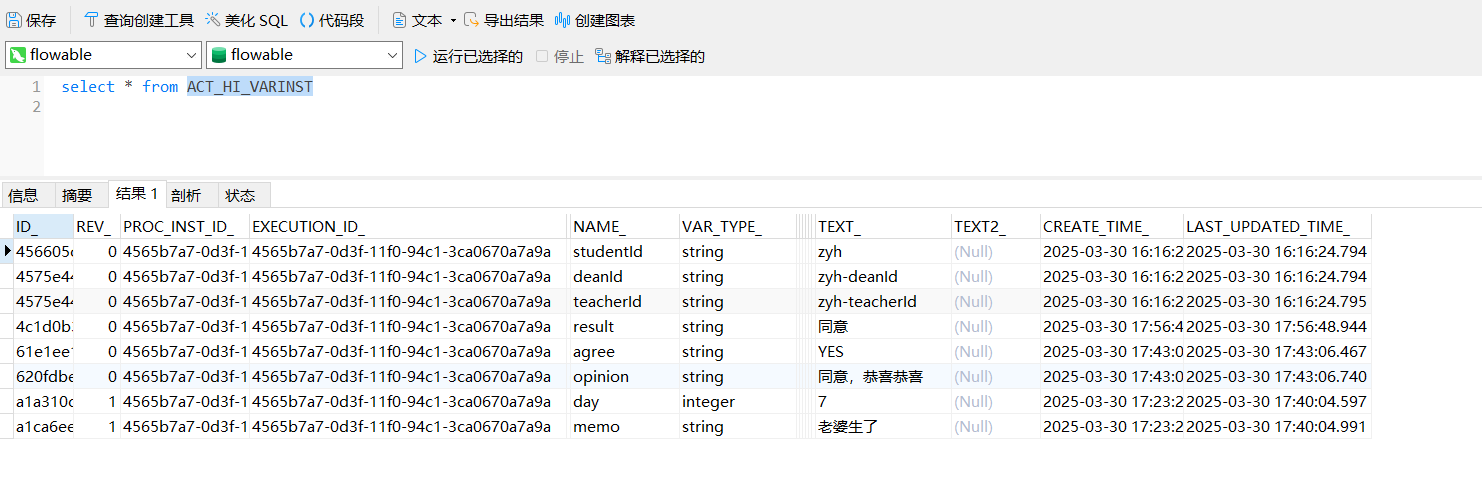
学院(zyh)请假流程实例的过程记录ACT_HI_ACTINST表中查询: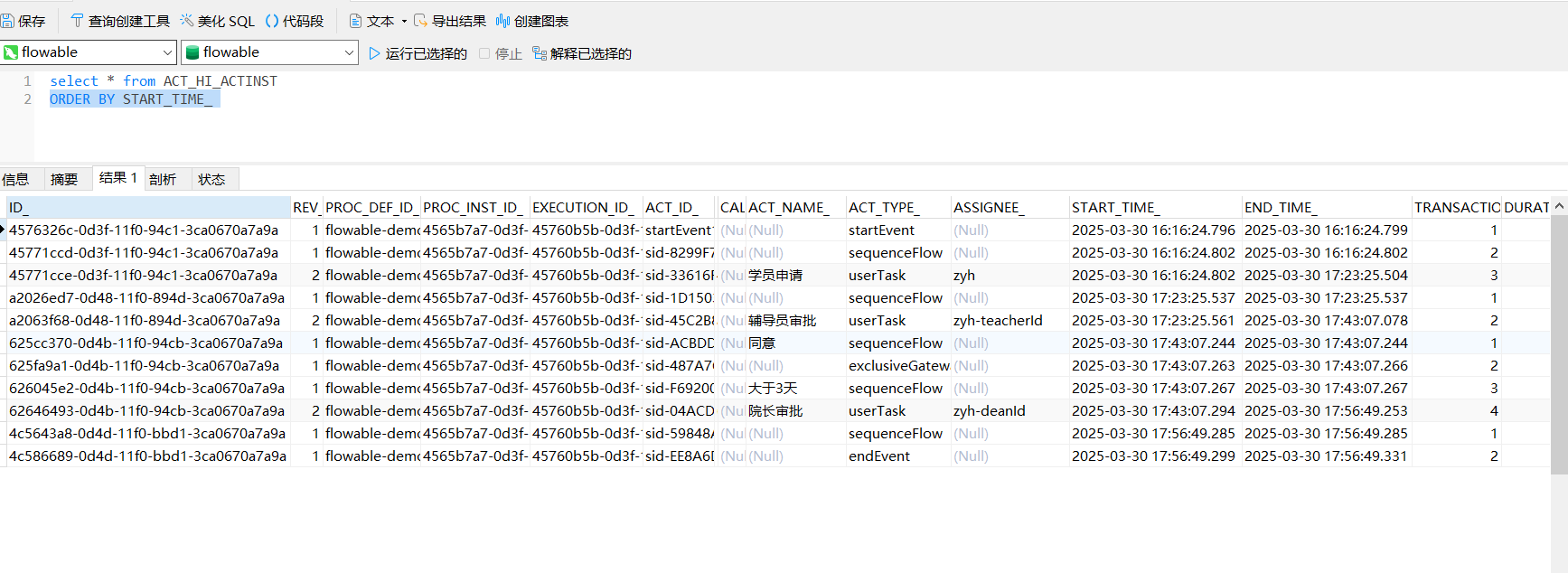
四,资源
leave.bpmn20.xml:
<?xml version="1.0" encoding="UTF-8"?>
<definitions xmlns="http://www.omg.org/spec/BPMN/20100524/MODEL" xmlns:xsi="http://www.w3.org/2001/XMLSchema-instance" xmlns:xsd="http://www.w3.org/2001/XMLSchema" xmlns:flowable="http://flowable.org/bpmn" xmlns:bpmndi="http://www.omg.org/spec/BPMN/20100524/DI" xmlns:omgdc="http://www.omg.org/spec/DD/20100524/DC" xmlns:omgdi="http://www.omg.org/spec/DD/20100524/DI" typeLanguage="http://www.w3.org/2001/XMLSchema" expressionLanguage="http://www.w3.org/1999/XPath" targetNamespace="http://www.flowable.org/processdef" exporter="Flowable Open Source Modeler" exporterVersion="6.8.0">
  <process id="flowable-demo" name="请假流程" isExecutable="true">
    <documentation>测试</documentation>
    <startEvent id="startEvent1" flowable:formFieldValidation="true"></startEvent>
    <userTask id="sid-33616FF3-C60C-45A0-B9B2-C31799F8EE37" name="学员申请" flowable:assignee="${studentId}" flowable:formFieldValidation="true">
      <extensionElements>
        <modeler:initiator-can-complete xmlns:modeler="http://flowable.org/modeler"><![CDATA[false]]></modeler:initiator-can-complete>
      </extensionElements>
    </userTask>
    <sequenceFlow id="sid-8299F7A6-6C77-4921-B7EF-076913863ACD" sourceRef="startEvent1" targetRef="sid-33616FF3-C60C-45A0-B9B2-C31799F8EE37"></sequenceFlow>
    <exclusiveGateway id="sid-487A7C7C-6C61-42F9-A75C-32B9D140B11C"></exclusiveGateway>
    <userTask id="sid-04ACDBA8-3907-4E6B-9A7B-A650A489ADC1" name="院长审批" flowable:assignee="${deanId}" flowable:formFieldValidation="true">
      <extensionElements>
        <modeler:initiator-can-complete xmlns:modeler="http://flowable.org/modeler"><![CDATA[false]]></modeler:initiator-can-complete>
      </extensionElements>
    </userTask>
    <endEvent id="sid-EE8A6DF8-7002-4482-A6A3-9DC3A7550B78"></endEvent>
    <userTask id="sid-45C2B851-5CED-4D4D-8DFB-93BE3FE38310" name="辅导员审批" flowable:assignee="${teacherId}" flowable:formFieldValidation="true">
      <extensionElements>
        <modeler:initiator-can-complete xmlns:modeler="http://flowable.org/modeler"><![CDATA[false]]></modeler:initiator-can-complete>
      </extensionElements>
    </userTask>
    <sequenceFlow id="sid-1D150389-5E49-4FBC-8FFD-7734A86FAD1E" sourceRef="sid-33616FF3-C60C-45A0-B9B2-C31799F8EE37" targetRef="sid-45C2B851-5CED-4D4D-8DFB-93BE3FE38310"></sequenceFlow>
    <sequenceFlow id="sid-F692009D-AFC6-48D9-85B1-FA6DE3EBD4DB" name="大于3天" sourceRef="sid-487A7C7C-6C61-42F9-A75C-32B9D140B11C" targetRef="sid-04ACDBA8-3907-4E6B-9A7B-A650A489ADC1">
      <conditionExpression xsi:type="tFormalExpression"><![CDATA[${day > 3}]]></conditionExpression>
    </sequenceFlow>
    <sequenceFlow id="sid-BEAF4EBE-81ED-4D5F-9231-7635AC2D2A62" name="小于等于3天" sourceRef="sid-487A7C7C-6C61-42F9-A75C-32B9D140B11C" targetRef="sid-EE8A6DF8-7002-4482-A6A3-9DC3A7550B78">
      <conditionExpression xsi:type="tFormalExpression"><![CDATA[${day <= 3}]]></conditionExpression>
    </sequenceFlow>
    <sequenceFlow id="sid-59848ABB-5B18-4EDA-B77B-473A4968452E" sourceRef="sid-04ACDBA8-3907-4E6B-9A7B-A650A489ADC1" targetRef="sid-EE8A6DF8-7002-4482-A6A3-9DC3A7550B78"></sequenceFlow>
    <sequenceFlow id="sid-A144F659-6142-47BA-B1CB-D0B160CDE7B1" name="不同意" sourceRef="sid-45C2B851-5CED-4D4D-8DFB-93BE3FE38310" targetRef="sid-EE8A6DF8-7002-4482-A6A3-9DC3A7550B78">
      <conditionExpression xsi:type="tFormalExpression"><![CDATA[${agree == 'NO'}]]></conditionExpression>
    </sequenceFlow>
    <sequenceFlow id="sid-ACBDDAFC-BC4F-4C0E-A691-5D88722F0FB4" name="同意" sourceRef="sid-45C2B851-5CED-4D4D-8DFB-93BE3FE38310" targetRef="sid-487A7C7C-6C61-42F9-A75C-32B9D140B11C">
      <conditionExpression xsi:type="tFormalExpression"><![CDATA[${agree == 'YES'}]]></conditionExpression>
    </sequenceFlow>
  </process>
  <bpmndi:BPMNDiagram id="BPMNDiagram_flowable-demo">
    <bpmndi:BPMNPlane bpmnElement="flowable-demo" id="BPMNPlane_flowable-demo">
      <bpmndi:BPMNShape bpmnElement="startEvent1" id="BPMNShape_startEvent1">
        <omgdc:Bounds height="30.0" width="30.0" x="120.0" y="145.0"></omgdc:Bounds>
      </bpmndi:BPMNShape>
      <bpmndi:BPMNShape bpmnElement="sid-33616FF3-C60C-45A0-B9B2-C31799F8EE37" id="BPMNShape_sid-33616FF3-C60C-45A0-B9B2-C31799F8EE37">
        <omgdc:Bounds height="80.0" width="100.0" x="240.0" y="120.0"></omgdc:Bounds>
      </bpmndi:BPMNShape>
      <bpmndi:BPMNShape bpmnElement="sid-487A7C7C-6C61-42F9-A75C-32B9D140B11C" id="BPMNShape_sid-487A7C7C-6C61-42F9-A75C-32B9D140B11C">
        <omgdc:Bounds height="40.0" width="40.0" x="620.0" y="140.0"></omgdc:Bounds>
      </bpmndi:BPMNShape>
      <bpmndi:BPMNShape bpmnElement="sid-04ACDBA8-3907-4E6B-9A7B-A650A489ADC1" id="BPMNShape_sid-04ACDBA8-3907-4E6B-9A7B-A650A489ADC1">
        <omgdc:Bounds height="80.0" width="100.0" x="765.0" y="120.0"></omgdc:Bounds>
      </bpmndi:BPMNShape>
      <bpmndi:BPMNShape bpmnElement="sid-EE8A6DF8-7002-4482-A6A3-9DC3A7550B78" id="BPMNShape_sid-EE8A6DF8-7002-4482-A6A3-9DC3A7550B78">
        <omgdc:Bounds height="28.0" width="28.0" x="626.0" y="300.0"></omgdc:Bounds>
      </bpmndi:BPMNShape>
      <bpmndi:BPMNShape bpmnElement="sid-45C2B851-5CED-4D4D-8DFB-93BE3FE38310" id="BPMNShape_sid-45C2B851-5CED-4D4D-8DFB-93BE3FE38310">
        <omgdc:Bounds height="80.0" width="100.0" x="420.0" y="120.0"></omgdc:Bounds>
      </bpmndi:BPMNShape>
      <bpmndi:BPMNEdge bpmnElement="sid-F692009D-AFC6-48D9-85B1-FA6DE3EBD4DB" id="BPMNEdge_sid-F692009D-AFC6-48D9-85B1-FA6DE3EBD4DB" flowable:sourceDockerX="20.5" flowable:sourceDockerY="20.5" flowable:targetDockerX="50.0" flowable:targetDockerY="40.0">
        <omgdi:waypoint x="659.4989804709837" y="160.44540229885058"></omgdi:waypoint>
        <omgdi:waypoint x="764.9999999999968" y="160.14312320916906"></omgdi:waypoint>
      </bpmndi:BPMNEdge>
      <bpmndi:BPMNEdge bpmnElement="sid-1D150389-5E49-4FBC-8FFD-7734A86FAD1E" id="BPMNEdge_sid-1D150389-5E49-4FBC-8FFD-7734A86FAD1E" flowable:sourceDockerX="50.0" flowable:sourceDockerY="40.0" flowable:targetDockerX="50.0" flowable:targetDockerY="40.0">
        <omgdi:waypoint x="339.95000000000005" y="160.0"></omgdi:waypoint>
        <omgdi:waypoint x="419.99999999997226" y="160.0"></omgdi:waypoint>
      </bpmndi:BPMNEdge>
      <bpmndi:BPMNEdge bpmnElement="sid-8299F7A6-6C77-4921-B7EF-076913863ACD" id="BPMNEdge_sid-8299F7A6-6C77-4921-B7EF-076913863ACD" flowable:sourceDockerX="15.0" flowable:sourceDockerY="15.0" flowable:targetDockerX="50.0" flowable:targetDockerY="40.0">
        <omgdi:waypoint x="149.9499992392744" y="160.0"></omgdi:waypoint>
        <omgdi:waypoint x="239.99999999996837" y="160.0"></omgdi:waypoint>
      </bpmndi:BPMNEdge>
      <bpmndi:BPMNEdge bpmnElement="sid-BEAF4EBE-81ED-4D5F-9231-7635AC2D2A62" id="BPMNEdge_sid-BEAF4EBE-81ED-4D5F-9231-7635AC2D2A62" flowable:sourceDockerX="20.5" flowable:sourceDockerY="20.5" flowable:targetDockerX="14.0" flowable:targetDockerY="14.0">
        <omgdi:waypoint x="640.437908496732" y="179.50569888961465"></omgdi:waypoint>
        <omgdi:waypoint x="640.0454395033162" y="300.0000727209533"></omgdi:waypoint>
      </bpmndi:BPMNEdge>
      <bpmndi:BPMNEdge bpmnElement="sid-A144F659-6142-47BA-B1CB-D0B160CDE7B1" id="BPMNEdge_sid-A144F659-6142-47BA-B1CB-D0B160CDE7B1" flowable:sourceDockerX="50.0" flowable:sourceDockerY="79.0" flowable:targetDockerX="14.0" flowable:targetDockerY="14.0">
        <omgdi:waypoint x="470.0082608695652" y="199.95"></omgdi:waypoint>
        <omgdi:waypoint x="471.0" y="314.0"></omgdi:waypoint>
        <omgdi:waypoint x="626.0" y="314.0"></omgdi:waypoint>
      </bpmndi:BPMNEdge>
      <bpmndi:BPMNEdge bpmnElement="sid-ACBDDAFC-BC4F-4C0E-A691-5D88722F0FB4" id="BPMNEdge_sid-ACBDDAFC-BC4F-4C0E-A691-5D88722F0FB4" flowable:sourceDockerX="99.0" flowable:sourceDockerY="40.0" flowable:targetDockerX="20.5" flowable:targetDockerY="20.5">
        <omgdi:waypoint x="519.9499999999985" y="160.00390946502057"></omgdi:waypoint>
        <omgdi:waypoint x="620.4173553719008" y="160.41735537190084"></omgdi:waypoint>
      </bpmndi:BPMNEdge>
      <bpmndi:BPMNEdge bpmnElement="sid-59848ABB-5B18-4EDA-B77B-473A4968452E" id="BPMNEdge_sid-59848ABB-5B18-4EDA-B77B-473A4968452E" flowable:sourceDockerX="50.0" flowable:sourceDockerY="79.0" flowable:targetDockerX="14.0" flowable:targetDockerY="14.0">
        <omgdi:waypoint x="815.0" y="199.95"></omgdi:waypoint>
        <omgdi:waypoint x="815.0" y="314.0"></omgdi:waypoint>
        <omgdi:waypoint x="653.9499248630951" y="314.0"></omgdi:waypoint>
      </bpmndi:BPMNEdge>
    </bpmndi:BPMNPlane>
  </bpmndi:BPMNDiagram>
</definitions>
补充一个方法,该方法的作用是将看到流程执行到那个节点了:
@GetMapping("/showProcessPic")
public void showProcessPic(HttpServletResponse resp,String processId) throws Exception {
    RuntimeService runtimeService = processEngine.getRuntimeService();
	ProcessInstance processInstance = runtimeService.createProcessInstanceQuery()
	        .processInstanceId(processId)
	        .singleResult();
	if (processInstance == null) {
	    resp.sendError(HttpServletResponse.SC_INTERNAL_SERVER_ERROR, "流程实例不存在");
	    return;
	}
	// 3. 获取当前活动节点(直接通过流程实例ID查询执行)
	List<String> activityIds = runtimeService.getActiveActivityIds(processId);
	RepositoryService repositoryService = processEngine.getRepositoryService();
	BpmnModel bpmnModel = repositoryService.getBpmnModel(processInstance.getProcessDefinitionId());
	ProcessEngineConfiguration engineConf = processEngine.getProcessEngineConfiguration();
	ProcessDiagramGenerator diagramGenerator = engineConf.getProcessDiagramGenerator();
	try (InputStream in = diagramGenerator.generateDiagram(
	        bpmnModel,
	        "png",
	        activityIds, // 高亮的活动节点
	        Collections.emptyList(), // 高亮的连线(根据需求填充)
	        engineConf.getActivityFontName(),
	        engineConf.getLabelFontName(),
	        engineConf.getAnnotationFontName(),
	        engineConf.getClassLoader(),
	        processInstance.getProcessDefinitionVersion(),
	        false
	)) {
	    // 6. 输出图片到响应流
	    resp.setContentType("image/png");
	    IOUtils.copy(in, resp.getOutputStream());
	} catch (Exception e) {
	    resp.sendError(HttpServletResponse.SC_INTERNAL_SERVER_ERROR, "生成流程图失败");
	}
}
如果返回的流程图中文乱码,添加如下配置即可:
@Configuration
public class FlowableConfig implements EngineConfigurationConfigurer<SpringProcessEngineConfiguration> {
    @Override
    public void configure(SpringProcessEngineConfiguration springProcessEngineConfiguration) {
        springProcessEngineConfiguration.setActivityFontName("宋体");
        springProcessEngineConfiguration.setLabelFontName("宋体");
        springProcessEngineConfiguration.setAnnotationFontName("宋体");
    }
}测试的代码:https://gitee.com/zyh1020/flowable.git
测试的postman:https://cloud.189.cn/web/share?code=BbQNRnmyUJ7z(访问码:mpe7)